Session Memory Design for Production LLMs
A team ships a customer support copilot that feels magical in demos. It remembers the last few turns, picks up the user’s product name from earlier in the conversation, and can continue a troubleshooting flow without asking repetitive questions. Then production traffic arrives.
Within two weeks, the support leads file contradictory bugs:
- “The assistant forgot the device model halfway through a troubleshooting session.”
- “The assistant keeps assuming every future issue is about the same device, even after the customer switches products.”
- “It remembered a user preference from last month that was no longer true.”
- “It surfaced notes from the wrong tenant.”
- “Prompt cost doubled after we added memory, but resolution rate barely moved.”
- “A hallucinated preference got saved as if it were a fact, and now the bot keeps repeating it.”
None of these are exotic failures. They are the default outcome when “memory” is treated as a single feature instead of a set of distinct state-management problems.
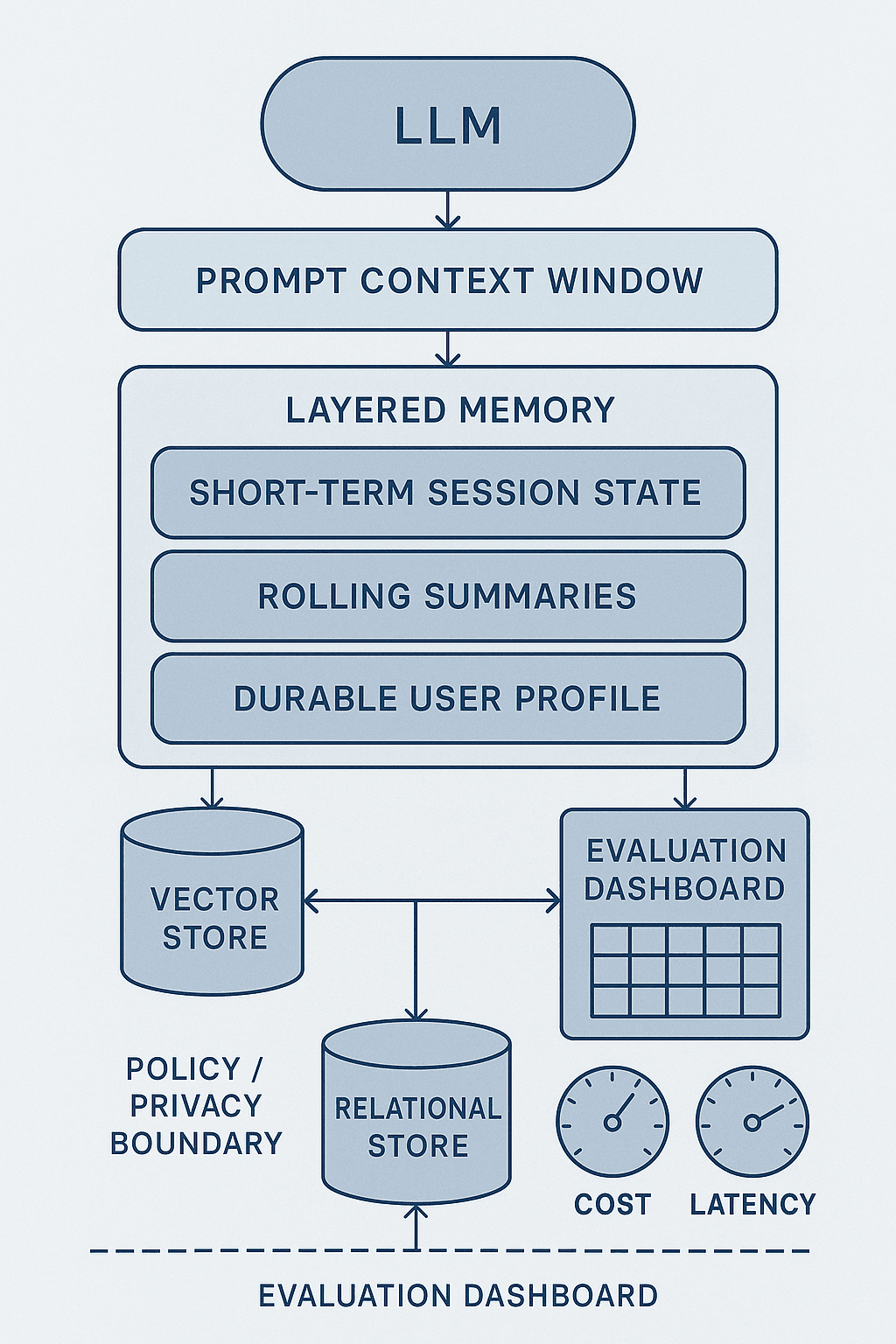
In production LLM systems, memory is not one thing. It is at least five things:
- Immediate conversational context that belongs in the prompt right now.
- Short-term session state that should survive across turns for the current task.
- Compressed summaries that preserve important history without carrying every token forward.
- Durable user or account facts that should persist beyond a single session.
- External records and events that should be retrieved as evidence, not rewritten as model-authored memory.
If you blend these together, you get contamination, stale assumptions, privacy bugs, and runaway token cost. If you separate them cleanly, you can make systems that feel consistent without becoming haunted by their own past.
This article is a practical guide to doing that. I’ll cover what belongs in the prompt versus session state versus summaries versus user profiles versus external stores; when to write, refresh, merge, or forget memory; how to evaluate whether memory helps instead of hurts; and how to keep costs, latency, and privacy under control.
The pattern: most memory failures are type errors
The common failure mode is not that the model lacks memory. It’s that the system stores the wrong kind of information in the wrong place.
A few examples:
- A temporary goal like “help me compare these two pricing plans” gets written into a durable profile as if it were a stable preference.
- A one-turn extraction like “the serial number is ABC-123” is left only in the prompt and lost when the window truncates.
- A model-generated summary says the user “prefers email support,” even though the user merely asked whether email support exists.
- A support CRM note with uncertain provenance gets copied into a user memory store and then treated as ground truth forever.
- The app stores verbatim conversation transcripts for convenience, then unintentionally rehydrates private or irrelevant data into future prompts.
These are state-modeling mistakes. The model then amplifies them.
A good production memory design starts with explicit categories:
1. Prompt context
This is the minimal set of information needed for the next model call.
Examples:
- Current user message
- Relevant tool outputs
- Current task instructions
- Session summary snippet
- A few high-confidence durable facts
Prompt context is expensive, latency-sensitive, and ephemeral. Its job is not to be the source of truth. Its job is to support the current inference.
2. Session state
This is short-term working memory for an ongoing task or conversation.
Examples:
- Which troubleshooting step the user is on
- The currently selected product/account/order
- Pending clarifications
- Form fields collected so far
- The active plan-comparison candidates
Session state should be structured when possible. Think state machine or task frame, not just raw chat history. It often expires after inactivity or task completion.
3. Rolling summaries
This is compressed history that preserves important context after the raw turn history gets too large.
Examples:
- “User is troubleshooting Device X. Already rebooted and updated firmware. Error persists after step 3.”
- “During this session, user compared Pro and Team plans and prioritized SSO plus audit logs.”
Summaries are lossy by design. That means they need clear scope, confidence, and refresh rules.
4. Durable profile memory
This is long-lived information about the user, account, team, or tenant that is expected to remain useful across sessions.
Examples:
- Preferred language
- Organization’s subscribed plan
- Named team members and roles
- Explicitly stated recurring preferences
- Stable environment facts like cloud provider or deployment region
Durable memory should be sparse, high-confidence, attributable, and governed. It is the easiest place to accidentally store incorrect information for a very long time.
5. External source-of-truth data
This includes CRM records, product catalogs, support tickets, documents, event logs, feature flags, and telemetry.
This is often not “memory” in the strict sense. It is retrievable evidence. In many systems, teams try to compensate for weak retrieval by stuffing external facts into memory. That usually makes the system less reliable, not more.
Why the naive approach fails
The naive architecture usually looks like this:
- Store all messages in a conversation table.
- Maybe summarize occasionally.
- Retrieve “memory” with embedding search over prior messages.
- Paste a big chunk of prior messages plus some summary into every prompt.
- Let the model infer what matters.
- Optionally ask the model to extract user facts and save them after each turn.
This can work for prototypes. In production, it fails in predictable ways.
Failure 1: the model cannot distinguish temporary state from durable facts
If the system saves every extracted fact from every conversation, the model eventually accumulates guesses, one-off intents, stale details, and outright hallucinations.
User says: “For this quarter, we’re testing Azure in one region.” Naive memory write: “Cloud provider = Azure.” Three months later that “fact” is injected into a planning conversation where it is no longer true.
Failure 2: summaries become silent corruption layers
Summaries are attractive because they save tokens. But each summary step is a lossy transformation. If a wrong detail enters the summary, it can become stickier than the original conversation because future prompts keep reusing the summary instead of the raw evidence.
A bad summary is often worse than no summary because it has an undeserved aura of system truth.
Failure 3: raw history retrieval has poor precision
Embedding search over chat logs sounds useful, but conversational text is noisy. Similarity retrieval tends to bring back semantically related but operationally irrelevant turns. If the user says “I’m still on the Team plan” and later asks about “team permissions,” retrieval may over-index on plan details when what matters is RBAC.
Failure 4: token cost scales faster than quality
Teams often respond to memory misses by adding more context. More turns, more summaries, more retrieved memories, more tool logs. Prompt cost rises and latency worsens, but answer quality plateaus because the bottleneck isn’t quantity of context. It’s context selection.
Failure 5: privacy and tenancy mistakes are easy to make
When memory is implemented as “retrieve past relevant text,” isolation bugs become catastrophic. A retrieval query with an incomplete tenant filter can expose another customer’s data. A summarizer that writes private conversation snippets into a durable memory table creates downstream compliance headaches.
Failure 6: debugging becomes nearly impossible
Without explicit memory types and write paths, it’s hard to explain why the assistant said something. Did it come from:
- the current prompt,
- a summary,
- a profile field,
- a retrieved note,
- a tool result,
- or the base model’s prior?
If you can’t trace provenance, you can’t fix regressions.
A better approach: layered memory with explicit contracts
The architecture that works in production looks more like a storage system than a chat transcript.
At a high level:
- Keep the prompt lean and purpose-built for the current turn.
- Maintain structured short-term session state for the active task.
- Generate rolling summaries only when needed, with narrow scope.
- Write durable memory sparingly via explicit extraction and validation policies.
- Treat business data and records as retrievable source-of-truth, not memory.
- Attach provenance, timestamps, confidence, and scope to every memory artifact.
- Build evals around memory usefulness, contamination, staleness, and cost.
A representative architecture:
Ingress
Each user turn enters an orchestration layer that classifies:
- intent/task type,
- whether this is part of an existing session,
- what entities are active,
- whether memory read/write should occur.
Read path
The orchestrator builds prompt context from several stores:
- current turn and recent turns,
- structured session state,
- session summary,
- a small number of durable profile facts,
- retrieved source-of-truth records,
- policy constraints.
Each item is selected by rule or retrieval policy, not dumped wholesale.
Generation/tool use
The assistant answers, possibly invoking tools.
Post-turn write path
A separate memory pipeline decides:
- update session state,
- refresh session summary,
- extract candidate durable facts,
- merge with existing profile memory,
- discard low-confidence or sensitive content,
- set expiration or review rules.
That post-turn pipeline should be explicit and testable. Do not hide memory writes inside the main generation prompt if you can avoid it.
Designing the five layers in practice
Layer 1: what should live in the prompt
The prompt should include only information that increases the probability of a better next action.
A good prompt payload often contains:
- System or role instructions
- Current user message
- The last few conversational turns, usually bounded tightly
- Structured session state relevant to the active task
- One short session summary
- 0–5 durable facts with high relevance and high confidence
- Retrieved documents or records needed for grounding
- Tool results from this turn
What should usually not go in the prompt:
- Full long-term transcript history
- Large profile dumps
- Old summaries with overlapping content
- Entire CRM records when only two fields matter
- Unfiltered retrieval chunks
- Any memory whose relevance cannot be explained
A useful heuristic: every prompt inclusion should answer one of these questions:
- Does the model need this to understand the current referents?
- Does the model need this to continue the active task correctly?
- Does this reduce ambiguity in a way the model can exploit immediately?
- Is this authoritative evidence for the current answer?
If the answer is no, leave it out.
Layer 2: session state for short-term continuity
Session state is the most underused memory layer. Many systems over-rely on chat history where they should use structured state.
For support, session state might include:
json{
  "active_product": "Router Model XR-12",
  "issue_type": "intermittent_disconnect",
  "troubleshooting_steps_completed": [
    "power_cycle",
    "firmware_check",
    "factory_reset"
  ],
  "current_step": "collect_led_status",
  "required_slots": {
    "firmware_version": "filled",
    "serial_number": "filled",
    "led_pattern": "missing"
  },
  "session_goal": "resolve current router issue"
}
This is dramatically more reliable than asking the model to infer state from ten prior turns every time.
Design principles for session state:
- Make it task-oriented, not conversationally exhaustive.
- Prefer explicit fields over prose where possible.
- Attach timestamps and last-updated turn IDs.
- Expire aggressively after inactivity or completion.
- Separate user-supplied facts from model-inferred fields.
If your system supports multiple workflows, define separate session-state schemas per workflow. A sales assistant, coding agent, support bot, and healthcare intake assistant should not share one generic “memory blob.”
Layer 3: rolling summaries without summary drift
Summaries are useful when sessions are long or branching, but they need discipline.
A practical summary schema:
json{
  "session_id": "...",
  "scope": "current support session",
  "summary": "User is troubleshooting Router Model XR-12. Already tried reboot, firmware verification, and factory reset. Connection drops every 20 minutes. Need LED pattern to continue diagnosis.",
  "open_questions": ["What is the current LED pattern?"],
  "decisions": ["Continue troubleshooting before recommending replacement"],
  "entities": ["Router Model XR-12"],
  "last_refreshed_at": "2026-07-23T10:15:00Z",
  "source_turn_range": [12, 28]
}
Important operational rules:
- Summarize only after a threshold, such as every N turns or when token budget is threatened.
- Preserve explicit open questions and unresolved branches.
- Keep summaries scoped to the session or task; do not turn them into global profiles.
- Maintain source ranges for auditability.
- Consider periodic regeneration from raw turns instead of recursively summarizing summaries forever.
That last point matters. Recursive summarization compounds errors. If a session gets long, it can be worth re-summarizing from a larger raw slice rather than chaining ten summary updates.
Summary model choices
For many teams, summary generation can use a cheaper model than the main answer model, but only if you validate quality. Summaries do not need creativity. They need fidelity.
Tradeoff:
- Smaller/cheaper model: lower cost, lower latency, possibly more omissions.
- Larger model: higher fidelity, but expensive if summarizing every turn.
Common pattern:
- Use a cheap model for candidate summary updates.
- Validate against simple checks or occasional stronger-model audits.
- Escalate to a better model for high-value workflows or when inconsistency is detected.
Layer 4: durable memory as a governed profile, not a transcript graveyard
Durable memory should be closer to a profile store than a conversation archive.
A good durable memory record often contains:
json{
  "memory_id": "mem_123",
  "tenant_id": "t_456",
  "subject_id": "user_789",
  "type": "preference",
  "key": "language",
  "value": "French",
  "confidence": 0.98,
  "source": {
    "kind": "user_explicit_statement",
    "conversation_id": "c_001",
    "turn_id": 14
  },
  "valid_from": "2026-07-01T00:00:00Z",
  "valid_to": null,
  "last_confirmed_at": "2026-07-20T12:01:00Z",
  "status": "active",
  "sensitivity": "low"
}
That is very different from “save this sentence from the conversation.”
What belongs in durable memory:
- Stable preferences explicitly stated by the user
- Role or organization facts that change rarely
- Long-lived environment or integration details
- Repeatedly validated preferences or constraints
What usually does not belong:
- Transient goals
- One-time issues
- Emotional states from a single interaction
- Guesses inferred indirectly by the model
- Sensitive details without clear business need and policy approval
Write policy: when to save durable memory
A simple policy framework:
Write only if all are true:
- The fact is likely to be useful beyond this session.
- The fact is sufficiently stable.
- The provenance is trustworthy.
- The information is allowed by privacy policy.
- The confidence exceeds threshold.
- The memory is not redundant with an authoritative external system.
Examples:
- “Please always answer in Spanish.” → save
- “I’m evaluating the Team plan this week.” → likely session-only
- “Our production cluster is in eu-west-1.” → maybe save at account level if relevant to recurring support flows
- “I think our admin left the company.” → do not save as fact without validation
Refresh, merge, and forget
Durable memory needs lifecycle management.
Refresh when:
- the user reaffirms a fact,
- the same fact appears consistently across sessions,
- an authoritative system confirms it.
Merge when:
- multiple equivalent memories differ only in phrasing,
- preferences can be normalized into one canonical field,
- account-level and user-level facts need precedence handling.
Forget or deactivate when:
- the user explicitly changes a preference,
- the memory conflicts with authoritative systems,
- the fact has not been confirmed for a long time,
- policy requires retention limits,
- the confidence was weak to begin with.
A useful pattern is soft deletion or inactive status rather than hard deletion for all operational cases, combined with strict privacy deletion workflows when required.
Layer 5: external stores are for evidence
Many facts should never be copied into memory at all.
Examples:
- Current subscription plan
- Ticket status
- Feature entitlements
- Invoice history
- Device telemetry
- Product specs
- Security policy settings
These belong in source systems and should be fetched as needed.
The decision rule is straightforward:
- If the fact changes operationally and has a system of record, retrieve it.
- If the fact is personal, stable, and conversationally useful, consider durable memory.
In other words: don’t write “current subscription plan = Team” into memory if you already have a billing API. Read from billing. Memory is not a cache of convenience unless you are prepared to own cache invalidation.
Memory write architecture: separate the writer from the responder
One of the best production decisions you can make is to decouple response generation from memory writing.
Why:
- It reduces prompt complexity on the main path.
- It lets you use different models for response and extraction.
- It makes memory writes observable, testable, and retryable.
- It supports asynchronous workflows.
A practical pipeline:
- User turn handled by responder.
- Responder emits structured events:
- user_explicit_preference_detected
- session_state_update_candidate
- summary_refresh_candidate
- sensitive_data_detected
- Memory worker consumes events.
- Extraction model creates candidate memory objects.
- Validation layer enforces schema, policy, confidence, and deduplication.
- Store writes occur with provenance and versioning.
This event-driven design is especially useful when you need human review for certain memory classes or when you want to replay traffic to test new memory policies.
Evaluation: memory quality is not “did the bot remember stuff?”
Memory needs a proper evaluation strategy or it will quietly degrade the system.
At minimum, evaluate across five dimensions.
1. Recall usefulness
Did the system surface the right prior information when it mattered?
Examples:
- In a troubleshooting continuation, did it remember the completed steps?
- In a follow-up sales conversation, did it remember the customer’s stated procurement constraints?
Measure with task-specific scenarios where relevant prior facts exist and should change the answer.
2. Precision / contamination
Did the system inject irrelevant, stale, or wrong memory?
Examples:
- It reused a previous product context after the user switched products.
- It brought in another teammate’s preference when the current speaker differed.
- It added an inferred preference as if explicit.
This is often the most important memory metric. Bad memory usually hurts more than missing memory.
3. Temporal correctness
Was the remembered fact valid at the time of use?
Examples:
- It cited an old plan tier after an upgrade.
- It used an outdated deployment region.
You need eval sets with changing facts over time, not just static golden examples.
4. Boundary enforcement
Did the system respect tenant, account, user, and policy boundaries?
Examples:
- No cross-tenant retrieval
- No mixing account-level facts into personal contexts without permission
- No sensitive memory inclusion without policy allowance
This should include adversarial tests, not just happy path.
5. Cost and latency efficiency
Did memory improve the outcome enough to justify token and retrieval overhead?
Track:
- prompt tokens per turn,
- retrieval calls per turn,
- memory-write calls per turn,
- p50/p95 latency,
- outcome lift versus no-memory or reduced-memory baselines.
Building a memory eval harness
A strong harness includes:
- Multi-turn synthetic scenarios with known ground truth
- Replay of real anonymized conversations
- Time-evolving facts with explicit change points
- Policy-sensitive cases for retention and privacy
- Counterfactual variants where a previously true memory becomes false
For each scenario, label:
- what should be remembered now,
- what should not be remembered,
- what should have been forgotten,
- what should come from source-of-truth retrieval instead of memory.
Then score both answer quality and memory behavior.
A useful annotation format:
json{
  "scenario_id": "support_014",
  "current_turn": "The issue is now with my printer, not the router.",
  "should_include": ["current account tier", "prior printer troubleshooting summary if same session"],
  "should_exclude": ["router troubleshooting state", "old inferred device preference"],
  "durable_memory_expected": [],
  "source_of_truth_reads_expected": ["device inventory API"]
}
Model and tool choices for memory components
Different memory tasks benefit from different model profiles.
Response generation
Usually your strongest model or your best quality/latency compromise.
Needs:
- reasoning over mixed context,
- tool use,
- instruction following,
- robustness to imperfect memory inputs.
Session-state extraction
Can often be handled by a smaller model if the schema is narrow and well-defined.
Needs:
- structured extraction,
- slot filling,
- low latency.
Summary generation
Often suitable for a cheaper model, with periodic audits.
Needs:
- fidelity over creativity,
- concise compression,
- open-question preservation.
Durable-fact extraction
Should prioritize precision over recall.
This is where teams get hurt by over-eager writes. It is often worth using a better model here or adding rule-based gating. Missing a writable memory is usually cheaper than writing a wrong one.
Retrieval stack
Use the simplest thing that preserves precision.
Options:
- rule-based key lookups for known profile fields,
- relational filtering for structured memory,
- vector search for free-text notes or documents,
- hybrid retrieval for external knowledge stores.
Do not use vector search by default for everything. A language preference should be a key-value read, not an embedding query.
Cost and latency tradeoffs
Memory systems can quietly dominate both.
Main cost drivers:
- prompt growth from injected history and memory,
- extra model calls for summarization/extraction,
- retrieval and reranking,
- write-path retries and validations.
Practical controls:
Use strict prompt budgets per memory layer
For example:
- recent turns: 800 tokens
- session state: 200 tokens
- session summary: 150 tokens
- durable profile: 100 tokens
- retrieved evidence: 1200 tokens
Hard budgets force prioritization.
Write less often than you think
You do not need to summarize every turn or extract durable memory after every message. Trigger writes on:
- session milestones,
- entity changes,
- explicit preference statements,
- impending context overflow,
- conversation end.
Prefer structured state over verbose text
A 120-token JSON state object often replaces 600 tokens of prior dialogue.
Tier your models
Use:
- stronger model for response,
- cheaper structured model for extraction/summaries,
- occasional audit model for quality monitoring.
Cache and invalidate carefully
If you cache rendered prompt fragments, tie them to versioned memory artifacts. Otherwise you will serve stale memory even after the underlying store updates.
Privacy, retention, and tenant boundaries
Memory is where LLM systems stop being toy chatbots and start becoming data systems.
That means you need standard data-governance rigor.
Boundaries to enforce
At minimum:
- tenant boundary
- account/workspace boundary
- end-user boundary
- role/permission boundary
- data-classification boundary
- retention boundary
Every memory artifact should carry these attributes explicitly. Never rely only on upstream assumptions.
Sensitive-data handling
Before durable writes, classify content for sensitivity:
- PII
- health/financial/legal categories where relevant
- secrets and credentials
- internal-only operational details
Default posture:
- do not store unless necessary,
- redact or tokenize when possible,
- separate highly sensitive memory classes into stricter stores,
- record policy basis for retention.
Right to deletion and correction
If a user requests deletion or correction, you need to know exactly where their state lives:
- transcript store,
- summaries,
- profile memory,
- cached prompt fragments,
- analytics copies,
- backups subject to policy.
If you cannot enumerate these, your memory architecture is not production-ready.
Debugging regressions caused by stale or incorrect memory
When teams first add memory, they often see a strange pattern: benchmark quality improves, but production trust declines. The reason is usually rare but high-severity contamination.
To debug this, you need traceability.
For every answer, log:
- which memory artifacts were read,
- why they were selected,
- token contribution per artifact,
- source provenance,
- whether the answer cited or used each artifact,
- which post-turn memory writes were attempted and accepted.
A memory trace should let an engineer answer:
- Why did the assistant think this user preferred phone support?
- Why was the old device still active in state?
- Why did the summary omit the completed step?
- Why did profile memory override a fresher CRM value?
Common regression patterns
1. Sticky entity carryover
The active entity from one task bleeds into the next.
Fix:
- explicit entity reset on task switch,
- state scopes per workflow,
- evals for abrupt topic changes.
2. Overwriting explicit truth with inferred memory
A model-inferred memory conflicts with a later direct user statement.
Fix:
- provenance ranking,
- explicit statements outrank inferred ones,
- conflict resolution rules.
3. Summary omission of unresolved branches
The summary captures what happened but drops what is still pending.
Fix:
- summary schema with mandatory
open_questionsandnext_step.
4. Retrieval of semantically similar but wrong history
Fix:
- stronger metadata filters,
- entity-aware retrieval,
- smaller top-k,
- reranking by recency and scope.
5. Durable memory bloat
The profile store grows into an uncurated junk drawer.
Fix:
- quotas by memory type,
- TTLs for weakly stable facts,
- dedupe jobs,
- write thresholds tuned for precision.
A reference decision framework: write, refresh, merge, forget
When new information appears, run it through a simple decision tree.
Write to prompt only if
- it matters for the current turn,
- and does not need persistence.
Write to session state if
- it is required to continue the active task,
- but likely not useful beyond the session.
Write to summary if
- it is important session history,
- and raw turns can no longer fit economically.
Write to durable profile if
- it is stable,
- useful across sessions,
- explicitly stated or otherwise high-confidence,
- and allowed by policy.
Retrieve from source-of-truth instead of memory if
- a live system owns the value,
- or freshness matters more than convenience.
Refresh if
- newer evidence supports the same fact,
- or confidence/timestamp should be updated.
Merge if
- multiple artifacts refer to the same canonical fact.
Forget/deactivate if
- the fact is contradicted,
- expired,
- low-confidence and unused,
- or no longer lawful to retain.
If your team encodes this framework into code and evals, memory becomes manageable.
Implementation blueprint
A concrete implementation can be surprisingly simple.
Data stores
conversation_turns: immutable raw turnssession_state: structured per-session object with TTLsession_summaries: versioned summaries with source rangesprofile_memory: durable typed facts with provenance/confidence/statusexternal_connectors: CRM, billing, telemetry, docsmemory_audit_log: read/write trace events
Orchestrator flow per turn
- Identify tenant, user, session, and active workflow.
- Load session state.
- Retrieve bounded recent turns.
- Load latest session summary if needed.
- Fetch a small set of relevant durable facts by key/rule.
- Query source-of-truth systems for current operational data.
- Assemble prompt under token budgets.
- Generate response/tool calls.
- Emit memory events.
- Async memory worker updates state/summary/profile.
Minimal schemas to start with
Use typed memories like:
preferenceidentity_or_roleenvironmentconstraintsession_progress
Do not start with “arbitrary note.” Arbitrary notes become arbitrary problems.
Conflict resolution precedence
A useful precedence order:
- live source-of-truth system
- current explicit user statement
- current-session state
- current-session summary
- durable profile memory
- older transcript retrieval
- model prior
Make this hierarchy visible to the responder and to engineers.
What teams usually get wrong
After implementing a few of these systems, I’d summarize the biggest practical lessons like this:
- Memory quality is mostly a data-modeling problem.
- Durable memory should be much smaller than teams initially expect.
- Session state carries more value than long transcript retrieval for many workflows.
- A wrong memory is often more damaging than a missing one.
- Summaries need provenance and refresh discipline.
- Source-of-truth retrieval should replace many would-be memory writes.
- If you cannot trace memory reads and writes, you will not be able to operate the system confidently.
- Token budgets force architecture clarity.
Takeaways
If you want session memory without regret, treat memory as a layered state architecture, not a magic recall feature.
Use the prompt for immediate inference, session state for active task continuity, summaries for compressed history, durable profiles for sparse long-lived facts, and external systems for authoritative operational data. Make writes explicit. Require provenance. Optimize for precision over recall in durable memory. Budget prompt tokens aggressively. Evaluate contamination and staleness, not just whether the bot “remembered.”
The winning design is usually not the one that remembers the most. It’s the one that remembers the right things in the right place for the right amount of time.
That’s what keeps a production LLM system helpful instead of haunted.