Model Context Protocol in Production: Designing Safe, Observable Tool Interfaces for Enterprise LLM Systems
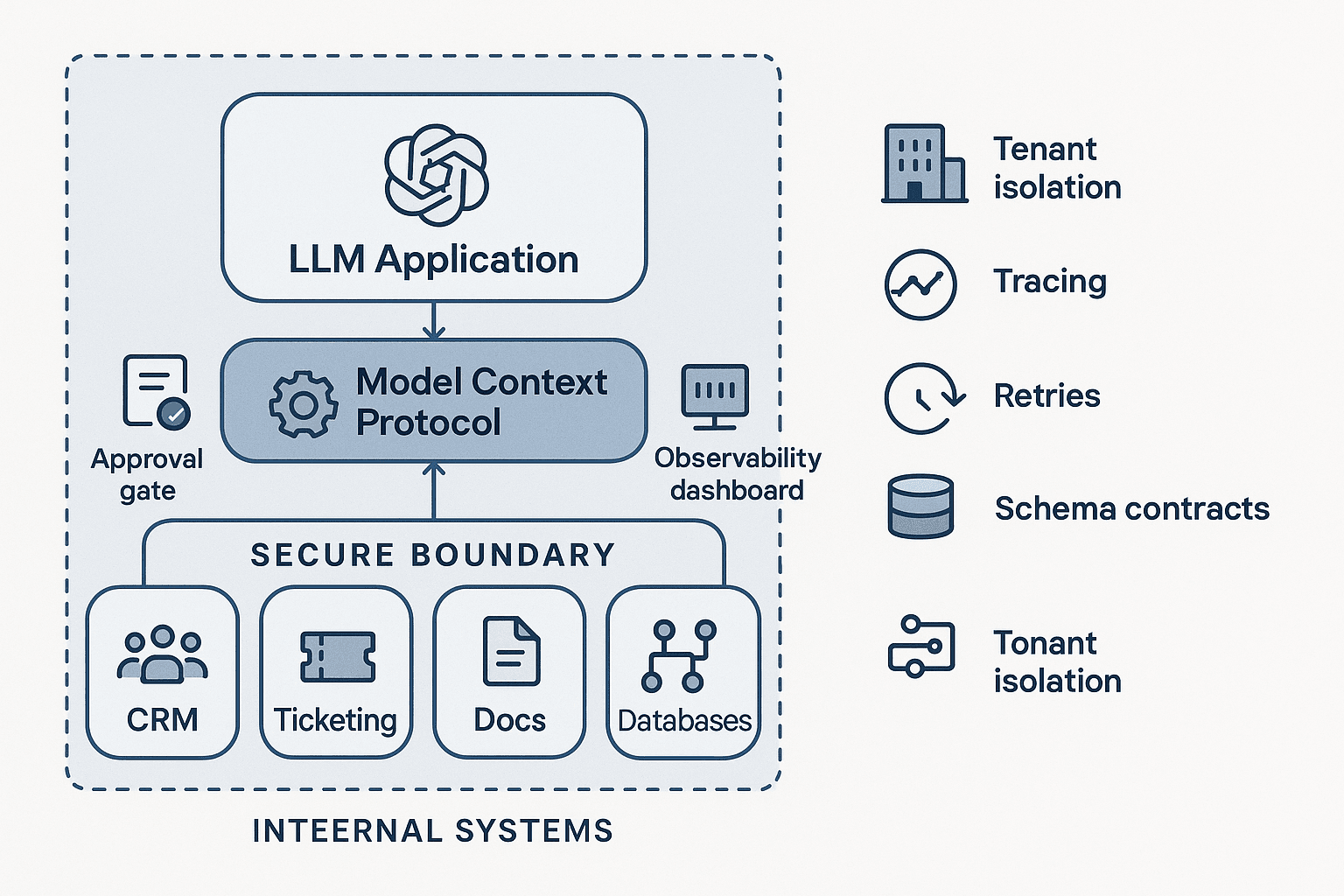
A team ships its first internal AI assistant and gets a quick win. Employees can ask for account summaries, search internal docs, draft responses, and kick off a few low-risk workflows. The prototype uses a handful of direct integrations: one function for the CRM, one for the ticketing system, another for document search, and a custom connector for a pricing database. At demo time, it looks great.
Three months later, the same team is dealing with a very different system.
There are now 40-plus tools, most built by different teams. Some return structured JSON, some return blobs of text, and some silently change behavior after upstream API changes. Authentication is inconsistent. A few tools run under a shared service account that can see far too much. Some tool calls take 300 ms; others hang for 45 seconds and pin the agent loop. There is no reliable way to tell which tool call drove a bad answer, or whether the model chose the wrong tool, passed the wrong arguments, or got back stale data. Compliance asks who approved a sensitive action. Security asks how tenant isolation is enforced. Platform engineering asks why every new agent requires six more one-off integrations.
This is where many enterprise LLM programs either stall or accumulate enough accidental complexity to become fragile. The problem is usually not the model. It is the interface layer between the model and enterprise systems.
That is the most useful way to think about the Model Context Protocol, or MCP, in production: not as a novelty for connecting models to tools, but as a control plane for tool and context access. MCP can become the contract boundary that turns a sprawl of ad hoc integrations into something governable, observable, and safe enough for production use.
The naive approach is to treat tool calling as just another SDK feature. If the model can call functions, and the functions can hit internal systems, it feels like the problem is solved. In practice, that is only the beginning. Enterprise deployments need a well-defined tool surface, policy enforcement, approval patterns, schema discipline, traceability, and rollout mechanisms that look much closer to an API platform than a prompt engineering project.
The rest of this article is about how to design MCP that way.
The recurring failure pattern
Most teams arrive at MCP, or something like it, after hitting the same class of failures.
Failure mode 1: Tool surface explosion
Every new use case adds more tools. Because tools are cheap to define, teams create narrowly scoped endpoints for each workflow: get_customer, get_customer_open_tickets, get_customer_contracts, create_followup_task, escalate_incident, run_refund_check, and so on. The model now has dozens or hundreds of choices, many overlapping, differently named, and inconsistently described.
Tool selection quality degrades as the surface grows. Even strong frontier models become less reliable when forced to choose among many semantically similar tools with uneven descriptions and different parameter conventions. Latency and cost rise because the agent often needs exploratory calls. Governance becomes impossible because nobody has a clean inventory of what the model is actually allowed to do.
Failure mode 2: Authentication by convenience
The prototype uses a backend service account because delegated auth is hard. The service account has broad read access across customers or business units. For write operations, the tool trusts application-layer checks that are inconsistently implemented.
This often works until an audit, or until the first cross-tenant exposure. The root issue is that the LLM interface is standing in front of systems that already have identity, authorization, and audit semantics, but the integration layer flattened them into “the assistant can call this API.”
Failure mode 3: Unsafe action semantics
Read tools and write tools are exposed the same way. The model can create tickets, send messages, issue credits, update records, or trigger workflows with no explicit approval policy beyond a prompt that says “be careful.” This is not a control.
Models are probabilistic systems. A tool interface that permits irreversible or customer-visible actions must have a first-class action governance model: approval, simulation, policy validation, and idempotency. Without that, the agent is one ambiguous sentence away from doing something expensive.
Failure mode 4: Tool output drift
A downstream team changes a field name, expands an enum, or starts returning partial records under error conditions. The model continues to receive output, but its reasoning quality degrades because the semantics changed even if the endpoint still technically works.
Because tool quality is usually assessed informally, these regressions are often discovered through user complaints instead of through evals or schema tests.
Failure mode 5: No observability across the LLM-tool boundary
Logs show the user message and the final answer, but not the chain of tool decisions, retries, latencies, authorization checks, or approval events. When something goes wrong, each team blames another layer.
Without traces that span prompt assembly, model calls, tool invocation, backend system response, and post-processing, production support becomes guesswork.
MCP can help with all of these, but only if you design it as a product and a platform.
What MCP should be in an enterprise architecture
In a production enterprise setting, MCP should play four roles.
1. Contract layer
MCP defines the shape of tools and context resources in a model-consumable format. This is not just serialization. It is where you standardize naming, descriptions, parameter schemas, result schemas, error semantics, and sensitivity metadata.
2. Policy enforcement point
MCP is the place to enforce auth propagation, tool-level authorization, tenant isolation, output redaction, rate limits, approval requirements, and allowed side effects. The model should never be trusted to self-enforce these constraints.
3. Observability spine
Every tool request and result should emit structured events: who requested it, on whose behalf, for which tenant, using which tool version, with what latency, returning what class of result, and leading to what model behavior. MCP is an ideal span boundary for distributed tracing.
4. Change management interface
Because MCP centralizes tool definitions, it becomes the place for versioning, rollout policy, deprecation, compatibility tests, and eval-driven release gates.
If you do not want an unmanageable tool surface, think of MCP less like a plugin catalog and more like an internal API gateway and service mesh for LLM-accessible capabilities.
Why the naive approach fails
The naive approach typically looks like this:
- Expose many backend functions directly as LLM-callable tools
- Let application prompts explain when to use them
- Depend on model intelligence for sequencing and safety
- Add ad hoc retries and timeouts inside each connector
- Handle auth in the easiest available way
- Evaluate by trying a handful of example prompts manually
This fails for structural reasons.
Models are bad substitutes for interface discipline
A model can infer intent, map fuzzy language to structured actions, and recover from minor ambiguities. What it does not do well is compensate for a poorly designed tool ecosystem. If ten tools could plausibly satisfy a request and their descriptions are inconsistent, you are asking the model to solve a taxonomy problem you should have solved in the platform.
Prompt-level safety is not real safety
Telling the model “never update a record unless authorized” is useful guidance, but it is not a reliable enforcement mechanism. If a tool is callable, then eventually it will be called under the wrong conditions. Safety for enterprise actions must be implemented at the policy and workflow layers.
Ad hoc connectors create hidden coupling
When each connector owns its own schema interpretation, retries, timeout behavior, and auth assumptions, system behavior becomes impossible to reason about globally. You cannot answer basic platform questions like:
- What is our default deadline budget for tool calls?
- Which tools can return customer PII?
- Which tools support impersonation versus delegated auth?
- Which actions require human approval?
- Which schema changes are backward compatible?
Manual testing misses the real regressions
The most painful production failures are not obvious 500s. They are behavior regressions: the agent chooses the wrong tool more often after you add five new tools; a write action is technically valid but violates business policy; a schema remains parseable but semantically shifts. These require behavioral evals, not just unit tests.
A better approach: MCP as a governed control plane
A production-ready MCP architecture typically has five layers.
Layer 1: Agent runtime
This is the orchestrator or application runtime that handles conversation state, planning, prompt assembly, tool eligibility, and final response generation. It should not connect directly to every enterprise system. Instead, it talks to MCP servers or an MCP gateway.
Layer 2: MCP gateway or broker
For enterprises, a gateway pattern is often preferable to fully unconstrained direct tool discovery. The gateway can:
- Filter tools by tenant, user role, and application
- Attach auth context
- Enforce rate limits and concurrency caps
- Apply policy checks before dispatch
- Add tracing metadata
- Normalize errors and deadlines
- Route to the correct MCP server versions
This gives you one place to implement cross-cutting concerns.
Layer 3: Domain MCP servers
Organize tools by domain, not by team whim. Good examples:
- Customer data server n- Knowledge and document retrieval server
- Incident and ticketing server
- Messaging and notification server
- Finance operations server
- Workflow/action execution server
Each server should own a coherent capability family and expose a deliberately small tool set. Resist the temptation to mirror every underlying API operation 1:1.
Layer 4: Policy and approval services
Sensitive actions should not execute directly from a model tool call. Instead, MCP tools should often create an action proposal that goes through policy evaluation and, if needed, human approval.
Examples:
- “Draft and queue a customer email” rather than “send email now”
- “Propose refund action” rather than “issue refund”
- “Prepare record update patch” rather than “write CRM field immediately”
The platform should support action states like simulated, pending_approval, approved, executed, rejected, and expired.
Layer 5: Enterprise systems and data sources
These remain the systems of record. MCP should not blur ownership boundaries. It is an access and orchestration layer, not a replacement for business systems.
Design principle 1: Minimize and shape the tool surface
One of the highest-leverage decisions you can make is to reduce the number of tools exposed to the model.
Prefer capability-oriented tools over API-shaped tools
Bad:
getAccountByIdgetAccountContactsgetAccountOpportunitiesgetTicketsByAccountgetInvoicesByAccount
Better:
fetch_customer_workspacesearch_customer_recordsprepare_customer_action
The better pattern composes multiple backend systems behind a model-facing capability. The model does not need to understand your internal service boundaries. It needs a stable semantic operation.
Make tools broad enough to be useful, narrow enough to be safe
A good production tool usually has:
- A clear intent domain
- Strongly typed inputs
- Predictable result structure
- An explicit scope boundary
- Clear side-effect semantics
A bad tool is either too granular to be practical or too generic to be governable. “Run arbitrary SQL” and “call any internal API” are not tools; they are uncontrolled execution surfaces.
Partition read, propose, and execute
This pattern is worth standardizing across the platform:
- Read tools: retrieve or search information
- Propose tools: generate a structured plan or patch for an action
- Execute tools: perform the side effect after policy and approvals
This makes model behavior easier to constrain and audit. It also enables simulation and review UX.
Design principle 2: Treat auth as end-to-end context, not connector trivia
Most enterprise risk in LLM systems shows up at the auth boundary.
Carry user and tenant identity through the entire chain
Every MCP request should include enough identity context to answer:
- Which end user initiated this?
- Which application or agent acted?
- Which tenant or business unit does this belong to?
- Was access delegated, impersonated, or performed by service role?
- Which scopes were granted?
Do not collapse all of that into a single backend token if you can avoid it.
Prefer delegated access for reads when feasible
If your underlying systems support acting on behalf of the user with their own permissions, that is usually preferable for retrieval. It keeps the assistant inside existing access boundaries.
For systems that do not support delegated auth, use narrowly scoped service identities plus explicit authorization checks in the MCP layer.
Separate discovery permissions from execution permissions
A model being able to know that a tool exists is not the same as being allowed to execute it. Tool catalogs should be filtered by role and application, and execution should still be checked at invocation time.
Enforce tenant isolation in the gateway and in the server
Do not rely on prompt instructions like “only access the current customer.” Tenant or business-unit scoping should be a hard filter injected into queries and verified on responses where possible. Defense in depth matters here.
Design principle 3: Use approval flows for consequential actions
Enterprise teams consistently underestimate how important approval design becomes once agents can do real work.
Define action classes
Classify tools into categories such as:
- Informational read
- Internal draft generation
- Reversible internal action
- External/customer-visible action
- Financial or compliance-sensitive action
- Irreversible administrative action
Each class should map to a default execution policy.
For example:
- Informational reads: allow automatically
- Internal drafts: allow automatically, log heavily
- Reversible internal actions: auto-execute under policy thresholds
- External actions: require preview plus user confirmation
- Financial/compliance actions: require dual approval or policy signoff
- Irreversible admin actions: disallow from LLM pathways entirely unless extremely controlled
Make approval state explicit in the tool protocol
The model should receive structured status, not vague text. Example:
json{
  "action_id": "act_123",
  "status": "pending_approval",
  "required_approvals": [
    {"type": "manager", "status": "pending"}
  ],
  "preview": {
    "refund_amount": 250,
    "customer_id": "cust_42"
  },
  "expires_at": "2026-08-12T18:30:00Z"
}
That allows the application to render the right UI and the model to reason correctly about next steps.
Require idempotency for writes
Every execute tool should support idempotency keys. Retries will happen. Without idempotency, your safety story falls apart the first time a network timeout occurs after the side effect succeeded.
Design principle 4: Govern schemas like APIs, because they are APIs
Tool schema quality directly affects agent reliability.
Standardize descriptions and parameter semantics
For each tool, define:
- What the tool is for
- When it should be used
- When it should not be used
- Required versus optional fields
- Enumerated values and business meanings
- Whether it can have side effects
- Whether approval may be required
- Sensitivity of returned fields
Tool descriptions are not docs for humans alone. They are part of the control signal for the model.
Version result schemas explicitly
Do not silently evolve tool outputs. Add explicit schema versions and compatibility rules. If you need to introduce a breaking change, version the tool or the result contract.
Prefer structured outputs over mixed prose
If a tool returns text that embeds status, records, warnings, and policy outcomes in a paragraph, you are making downstream reasoning harder and observability weaker. Prefer outputs like:
json{
  "status": "ok",
  "records": [...],
  "warnings": [...],
  "source_freshness": {...},
  "policy_flags": [...]
}
You can still include a human-readable summary field, but do not make it the source of truth.
Add semantic contract tests
A schema validator only tells you that JSON is shaped correctly. It does not tell you whether fields still mean what the model thinks they mean. Maintain fixture-based tests and behavioral evals around representative tool outputs.
Design principle 5: Engineer for latency, retries, and partial failure
The agent loop magnifies infrastructure sloppiness.
Set default timeout budgets centrally
Have platform-level classes of tools with explicit latency targets, for example:
- Fast retrieval: 1 to 2 seconds
- Aggregated reads: 3 to 5 seconds
- Approval/proposal creation: 5 to 8 seconds
- Execution calls: 10 seconds plus async fallback
Avoid unlimited waits. If a backend takes 30 seconds regularly, consider converting that operation into an async job that returns a handle.
Distinguish retryable from non-retryable failures
Common retryable cases:
- 429 rate limiting
- Transient network failure
- Upstream 5xx
- Deadline exceeded before side effect started
Common non-retryable cases:
- Validation failure
- Authorization denied
- Approval missing
- Business rule violation
Expose these distinctions explicitly so the agent runtime does not blindly retry everything.
Prefer async handles for expensive work
For long-running operations, tools should return something like:
json{
  "status": "accepted",
  "job_id": "job_456",
  "poll_tool": "get_job_status",
  "eta_seconds": 20
}
This prevents agent threads from blocking and gives the application a chance to notify users properly.
Design for partial results
Enterprise systems are messy. A “customer workspace” tool may succeed in fetching CRM and ticket data while the billing system is temporarily unavailable. Returning a partial result with source-level status is often better than failing the whole operation, as long as the partiality is explicit.
Observability: if you cannot trace it, you cannot operate it
For enterprise MCP deployments, tracing is not optional.
Emit spans at each critical boundary
At minimum, create spans for:
- User request received
- Prompt/context assembly
- Model inference call
- Tool eligibility filtering
- MCP request dispatch
- Policy evaluation
- Backend system request
- Approval state transition
- Final response generation
Correlate all spans with request ID, conversation/session ID, user ID, tenant ID, tool name, tool version, model name, and prompt/template version.
Log normalized tool events
You want a clean event model, not connector-specific chaos. A useful event schema includes:
- Timestamp
- Request and trace IDs
- Actor and tenant
- Tool name and version
- Input schema version
- Redacted input hash or selected safe arguments
- Auth mode used
- Policy decision
- Approval state
- Result class
- Latency
- Retry count
- Cost attribution if relevant
Capture model-tool decision quality
Observability should not stop at infrastructure metrics. Track behavioral metrics such as:
- Tool call rate per request
- Wrong-tool rate from labeled evals
- Tool argument validation failure rate
- Approval-request rate
- Human override rate
- Final answer groundedness after tool use
- Hallucinated citation or source attribution rate
These are the metrics that actually predict user trust.
Evaluation strategy: test the tool layer, not just the model
The strongest production teams treat tool interface evals as a first-class release gate.
Build three layers of evals
1. Contract evals
These verify:
- Tool descriptions meet required metadata fields
- Schemas validate
- Sample payloads parse correctly
- Backward compatibility rules hold
- Sensitive fields are tagged correctly
These run in CI and are cheap.
2. Behavioral agent evals
These use realistic prompts and expected trajectories. For example:
- Does the agent choose
fetch_customer_workspacerather than making three redundant reads? - Does it ask for approval before any customer-visible action?
- Does it avoid finance tools for unsupported roles?
- Does it recover correctly from one source timing out?
These should score tool choice, argument quality, policy compliance, latency, and final answer quality.
3. Adversarial and safety evals
These probe:
- Prompt injection via retrieved content
- Cross-tenant data access attempts
- Requests to bypass approval flows
- Malformed or oversized tool outputs
- Schema poisoning and enum drift
- Retry storms and duplicate write hazards
If MCP is your control plane, these evals are how you know the controls actually work.
Use offline and shadow evaluations before rollout
Before exposing a new MCP server or tool version broadly, run it in shadow mode against production-like traffic. Compare:
- Tool selection distribution
- Success/failure classes
- Latency percentiles
- Approval rates
- Human-rated outcome quality
- Unexpected policy denials or over-permissive grants
This is especially important when consolidating many direct integrations behind a new MCP layer.
Model and tool strategy: which model does what?
MCP does not remove model tradeoffs. It makes them easier to manage.
Large frontier model for planning, smaller model for classification and routing
A common production pattern:
- Use a strong frontier model for ambiguous user requests, complex synthesis, and multi-step planning
- Use smaller, cheaper models or deterministic logic for tool eligibility filtering, schema validation hints, summarization, or approval categorization
This can reduce cost significantly while keeping quality where it matters.
Deterministic policy engine over model judgment
Do not ask the model whether an action is allowed. Put authorization, threshold checks, required approvals, and tenant rules in deterministic policy code. The model can propose; the policy engine decides.
Retrieval tools should hide retrieval complexity
Do not expose separate vector search, keyword search, reranker, and document fetch tools unless you are building a very specialized research agent. Most enterprise assistants do better with one retrieval capability that internally handles hybrid retrieval, reranking, and chunk packaging.
That reduces tool confusion and gives you one place to tune relevance, freshness, and prompt injection defenses.
Cost and latency tradeoffs
MCP can either lower or increase system cost depending on how you design it.
Where MCP reduces cost
- Fewer redundant tool calls due to a shaped tool surface
- Better caching at the gateway or server layer
- Reuse of retrieval and policy infrastructure across agents
- Cheaper model usage because tool descriptions and context are cleaner
- Lower operational support cost through observability and governance
Where MCP adds cost
- Extra network hops through a gateway
- Policy checks and approval orchestration
- Schema governance and version maintenance
- Tracing and event storage
- Behavioral eval infrastructure
In practice, most enterprises should gladly pay the platform cost because the alternative is hidden reliability and compliance cost that surfaces later in more painful ways.
Practical latency guidance
- Keep tool catalogs per agent small; large catalogs increase planning latency and wrong-tool selection
- Cache static tool metadata aggressively
- Use deadline propagation from user request to backend calls
- Convert long-running writes into async workflows
- Aggregate related backend reads behind one MCP tool when it improves user-perceived latency
- Do not over-orchestrate; sometimes one well-designed domain tool beats a multi-step agent plan
Rollout patterns that work in real organizations
Adopting MCP across an enterprise is as much an org design problem as a technical one.
Pattern 1: Start with one domain and one high-value workflow
Pick a workflow where:
- The current integration sprawl is already painful
- Read-heavy usage dominates early demand
- There is an obvious need for auditability
- Domain experts are available to define the contract properly
Customer support and internal knowledge workflows are common starting points.
Pattern 2: Create a platform standard, not just a reference server
You need a written standard for:
- Tool naming
- Required metadata
- Auth propagation
- Approval classes
- Timeout budgets
- Error taxonomy
- Trace fields
- Versioning policy
- Evals required for release
Without standards, every server team will reinvent MCP differently and you will recreate the original sprawl at a higher layer.
Pattern 3: Use a review board for new tool classes
Not every individual tool needs a committee, but new categories of capability should get architecture and risk review. The first finance action tool, the first HR data tool, and the first outbound messaging tool deserve extra scrutiny because they establish patterns others will copy.
Pattern 4: Shadow mode before execute mode
For action tools, start with:
- Read only
- Then propose-only with previews
- Then human-approved execution
- Then narrow auto-execution for well-bounded cases
This progression catches issues in tool semantics and approval UX before you create expensive incidents.
Pattern 5: Sunset direct integrations aggressively
If teams can keep bypassing MCP and adding direct tool integrations to agent runtimes, your control plane will never become the actual control plane. Deprecate and remove the old path.
A reference production blueprint
Here is a pragmatic reference design for many enterprise teams.
Request flow
- User submits a request in an application.
- Agent runtime resolves user identity, tenant, role, and conversation state.
- Tool eligibility service asks the MCP gateway for tools allowed for this actor and app.
- Gateway returns a small filtered catalog with metadata including side-effect class and approval hints.
- Model plans using only eligible tools.
- On tool invocation, gateway attaches auth context, trace IDs, deadlines, and idempotency metadata.
- Domain MCP server validates input against schema, checks policy hooks, and dispatches to backend systems.
- If action is consequential, server creates an action proposal and sends it to approval service instead of executing immediately.
- Results come back in structured schema with status, warnings, freshness, and policy fields.
- Agent runtime synthesizes final answer and renders any approval UX.
- All steps emit traces and normalized events for analytics and incident review.
Core services
- MCP gateway
- Tool catalog and schema registry
- Auth context propagation service
- Policy engine
- Approval workflow service
- Trace and event pipeline
- Evals runner and release gate
- Domain MCP servers
This looks like real platform engineering because it is real platform engineering.
Implementation details teams often miss
Include sensitivity metadata in tool outputs
If a tool can return PII, financial data, contract terms, or regulated content, tag it. Downstream applications may need to mask fields, suppress logging, or require a tighter review path.
Separate user-visible summaries from machine state
Many teams mix both into one field. Keep a structured machine-readable payload plus an optional natural-language summary. This improves determinism and supports better UI rendering.
Bound output sizes
Large raw outputs can blow up token cost, increase latency, and create injection surface. Domain servers should summarize or window data before returning it to the model, while preserving links or handles for drill-down.
Add freshness and provenance everywhere
For retrieved content and aggregated business data, include:
- Source system
- Record IDs
- Retrieved timestamp
- Last-updated timestamp if available
- Confidence or completeness flags
This helps both models and humans reason about stale or partial data.
Make policy denials legible
A denial should be structured and explainable enough for the application to guide the user. “Forbidden” is not useful. “Action requires finance approver for refunds above $100” is useful.
The biggest mindset shift
The most important shift is this: MCP in production is not mainly about making more tools available to the model. It is about making fewer, better, safer tools available under strong control.
If your MCP deployment becomes a thin wrapper over every internal API, you will recreate the same complexity and risk that already exists in enterprise integration, except now a probabilistic system sits on top of it. If instead you use MCP to define capability contracts, auth boundaries, approval semantics, and observability standards, you get something much more valuable: a durable interface between language models and business systems.
That interface is what lets multiple teams build agents without each reinventing integration safety. It is what gives security and compliance a place to enforce policy. It is what gives platform teams release gates and traceability. And it is what keeps your tool surface from turning into an unbounded attack surface.
Takeaways
If you are adopting MCP for enterprise LLM systems, the practical playbook is straightforward.
- Treat MCP as a control plane, not a connector catalog.
- Shape the tool surface aggressively; expose capabilities, not raw APIs.
- Separate read, propose, and execute paths.
- Propagate identity and tenant context end to end.
- Enforce auth and approval in deterministic systems, not prompts.
- Govern schemas like public APIs, with versioning and compatibility tests.
- Instrument the full model-tool-backend chain with tracing and normalized events.
- Build behavioral and adversarial evals around tool choice, policy compliance, and failure handling.
- Roll out action tools progressively: read, propose, approve, then narrow auto-execute.
- Sunset direct integrations so MCP becomes the actual platform standard.
The teams that succeed with enterprise agents are rarely the ones with the fanciest prompts. They are the ones that make tool access boring, predictable, observable, and safe.
That is the real production value of MCP.