Async and Queue-Based Long-Running LLM Workflows
Most teams only discover they need async execution after they ship a synchronous prototype that works beautifully in demos and then collapses in production.
A common pattern looks like this: a user uploads a 200-page contract package and asks for a risk summary with citations. The request enters your API, the app runs document parsing, chunking, retrieval, several tool calls, maybe OCR on scanned pages, then invokes one or more LLMs to extract clauses, compare them against policy, and draft the final summary. In the happy path, maybe it finishes in 18 seconds. In the less happy path, OCR is slow, one source system rate-limits you, retrieval has to re-index a malformed document, and the final answer takes 75 seconds.
Now you have a problem that is not really about prompting.
Your frontend times out. Your API gateway may cut the connection at 30 or 60 seconds. Mobile clients retry because they think the request failed. Users click submit again. Workers duplicate tool side effects. One step succeeds, another fails, and no one can tell whether to retry from the start or resume halfway through. Support gets screenshots of a spinning loader with no progress indicator. Finance notices token burn spiking because duplicate jobs are common under load. Engineering notices p95 latency is meaningless because the workload distribution is bimodal: quick jobs finish in a few seconds, while large jobs stretch into minutes.
This is where many LLM systems stop being “AI features” and start becoming distributed systems.
If your workflow regularly exceeds an interactive latency budget, you should move it out of the request path and design it as an asynchronous, queue-backed, stateful process. That sounds obvious in retrospect, but a lot of teams delay it because the synchronous version is simpler to reason about. Unfortunately, with long-running RAG and tool-using workflows, synchronous execution often fails in ways that are operationally expensive and hard to debug.
This article is a production-focused guide to designing async and queue-based execution for long-running LLM workflows. I’ll cover the architecture patterns that work, why naive queueing is not enough, how to model resumable agent steps, how to provide user-visible progress without lying, and how to think about retries, dead-letter queues, callback idempotency, SLA classes, and observability.
The failure pattern: treating long-running LLM work like ordinary HTTP request handling
The first mistake is to think of an LLM workflow as one request to one model.
In production, many valuable workloads are not a single model invocation at all. They are a graph of dependent steps:
- ingest input
- validate permissions and quotas
- preprocess files
- retrieve data from internal systems
- run OCR or parsing
- embed and index if needed
- perform retrieval
- call one or more models
- invoke external tools or APIs
- ask follow-up planning questions internally
- postprocess the answer
- store artifacts
- notify the user
As soon as you have a graph of steps with variable runtimes, partial side effects, and external dependencies, your system inherits all the failure modes of asynchronous distributed processing.
The naive implementation is usually one of these:
- Keep everything inside one synchronous API request
- Add a background thread or fire-and-forget task inside the web server
- Push one big job to a queue and let one worker do everything
All three can work for toy systems. All three break down at scale.
Why synchronous requests fail
The immediate issue is latency budgets. Users tolerate different wait times depending on context, but interactive UX generally wants something within a few hundred milliseconds to a few seconds. Once you move beyond maybe 5–10 seconds, you need a very deliberate user experience. Once you move beyond 20–30 seconds, many network intermediaries and clients become unreliable anyway.
Even if your request technically can stay open, long-lived synchronous requests create secondary problems:
- application servers tie up memory and connection slots
- load balancers and proxies become part of workflow reliability
- retries from clients cause duplicate execution
- cancellation is ambiguous
- progress reporting is nearly impossible
- partial failures have no durable workflow state
Why in-process background work fails
Teams often try to “fix” this by returning HTTP 202 and spawning a background task in the app server. This is better than blocking the request, but it is still fragile.
If the process restarts, you lose the task. If the deployment rolls during execution, you orphan work. If the worker crashes after making an external tool call but before saving state, you don’t know what happened. Horizontal scaling adds more copies of app instances but not necessarily safe coordination.
In-process background tasks are acceptable for small, non-critical work with no strict reliability requirements. They are not a serious foundation for long-running LLM workflows that matter to customers.
Why one giant queue job fails
The next step up is a real queue. Good move, but incomplete.
A lot of teams push a single “run workflow” job to a queue and let a worker handle the full lifecycle. This helps decouple request latency from execution, but creates new issues:
- no visibility into intermediate step status
- retries restart too much work
- one transient failure can replay expensive model calls
- impossible to distinguish retriable vs terminal step failures cleanly
- no natural checkpointing for resumability
- difficult to apply different timeouts and concurrency controls per step
The core insight is this: for long-running LLM workflows, async execution is not just about using a queue. It is about explicit workflow state and resumable steps.
Pattern identification: when async is the right default
Not every LLM call needs a workflow engine. For chat completions, autocomplete, or low-latency extraction from small inputs, synchronous APIs are still the right answer.
Async becomes the default when one or more of the following are true:
- p95 runtime exceeds your interactive budget
- work depends on slow or rate-limited external systems
- workflows involve multiple model calls or tool invocations
- there are expensive preprocessing steps like OCR or indexing
- jobs fan out across documents, entities, or subtasks
- users need durable status and result retrieval later
- retries must resume from partial progress
- execution may continue after the user closes the browser
- backpressure and prioritization matter
- you need SLA tiers across tenants or workloads
Typical examples include:
- enterprise RAG over large uploaded document sets
- agentic research workflows with browsing and tool use
- compliance review and policy checks
- asynchronous report generation
- code migration analysis across repositories
- call transcript processing pipelines
- batch enrichment or summarization jobs
If your product includes any of these, build async intentionally, not as a later patch.
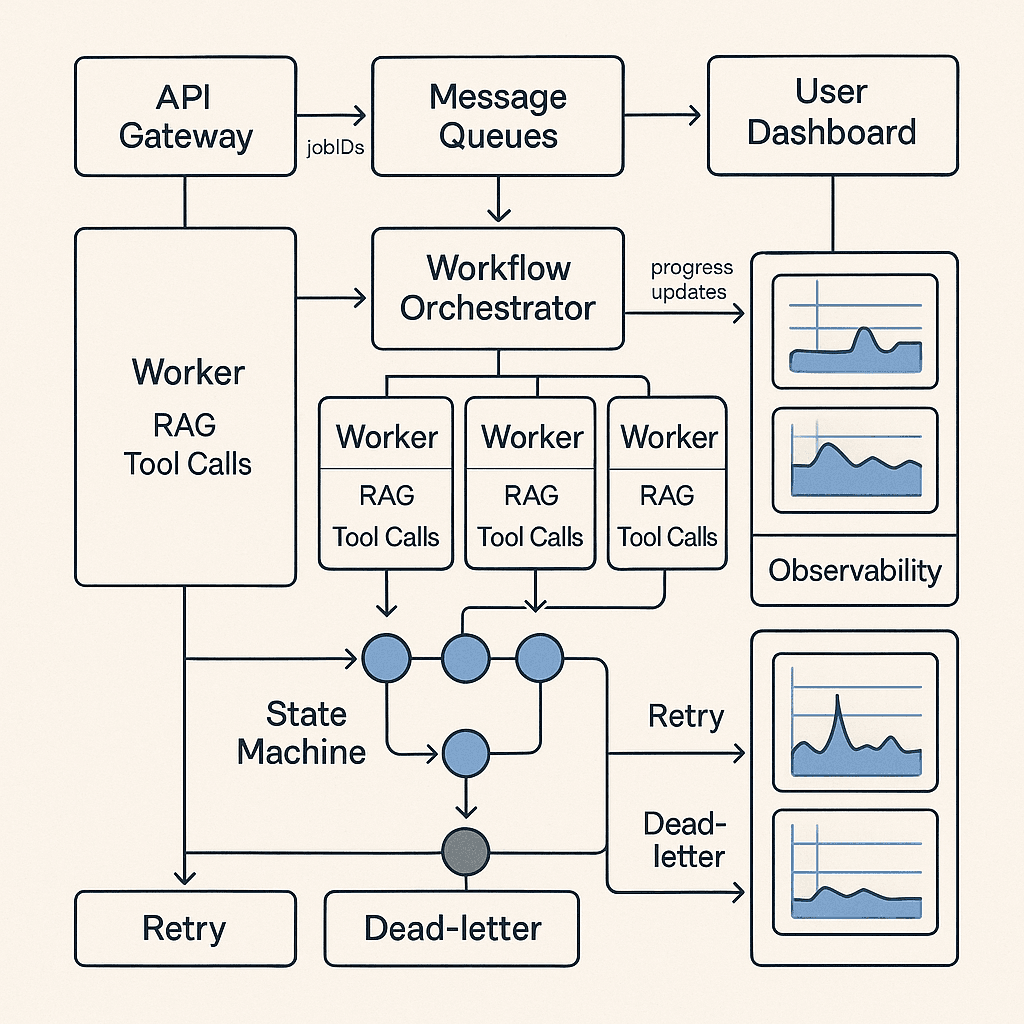
The better approach: API + queue + workflow state machine + workers
The architecture I recommend has four explicit layers:
- Submission API
- Durable workflow state store
- Queue and worker execution layer
- Result delivery and progress notification layer
In more mature systems, a fifth layer appears:
- Workflow orchestrator or state machine engine
At a high level, the lifecycle looks like this:
- Client submits work.
- API validates input, assigns a job ID, stores initial workflow state, and returns immediately with 202 Accepted.
- The system enqueues the first executable step.
- Workers consume step tasks, execute them, persist outputs and state transitions, and enqueue downstream steps.
- The client polls status, subscribes over SSE/WebSocket, or receives a webhook when done.
- If a step fails, retry policy and state machine rules determine whether to retry, compensate, pause for review, or dead-letter.
This is not exotic infrastructure. It is the same class of design you use for payment processing, video transcoding, ETL, or order fulfillment. The main difference with LLM systems is that runtime variance, cost variance, and nondeterminism are much higher, and prompt/tool changes can change workflow behavior dramatically.
A concrete reference architecture
A practical production architecture for long-running LLM workflows might look like this:
1. Submission API
Responsibilities:
- authenticate and authorize
- validate payload size, schema, and quotas
- assign
job_idandidempotency_key - classify SLA/priority
- persist workflow record in database
- enqueue initial step
- return 202 with status URL
Response shape example:
json{
  "job_id": "job_8f2c...",
  "status": "queued",
  "status_url": "/v1/jobs/job_8f2c",
  "events_url": "/v1/jobs/job_8f2c/events",
  "result_url": "/v1/jobs/job_8f2c/result",
  "estimated_sla_seconds": 120
}
The API should not attempt to “do a little bit of the work first” unless that work is cheap and deterministic, such as validation, small metadata extraction, or quota checks. Do not quietly turn your async system back into a synchronous one at the front door.
2. Workflow state store
Use a durable database to record workflow state. This is not optional.
At minimum store:
- job metadata: tenant, user, input references, timestamps, SLA class
- current workflow state
- step-level states
- attempt counts
- outputs/artifact references
- error codes and messages
- progress events
- callback delivery status
Common choices:
- Postgres for transactional simplicity and auditability
- DynamoDB/Cosmos/Firestore-style stores for massive scale and simpler keyed access
- object storage for large artifacts, with references in the workflow DB
A relational database is often underrated here. For many enterprise workloads, Postgres plus object storage gets you very far, especially if you care about traceability and ad hoc debugging.
3. Queue layer
Use a real queue or log-backed consumer system:
- SQS
- RabbitMQ
- Kafka
- Google Pub/Sub
- Azure Service Bus
- Redis streams/BullMQ for smaller-scale or lower-criticality systems
The queue should carry executable step tasks, not just “run everything” jobs.
A queue message usually includes:
- job ID
- step ID or step type
- attempt number
- lease/visibility timeout metadata
- trace/correlation IDs
- dedupe key if supported
4. Workers
Workers should be specialized where useful.
Examples:
- document parsing workers
- retrieval/indexing workers
- LLM inference workers
- tool invocation workers
- notification/callback workers
Why specialize?
Because different steps have different:
- CPU and memory profiles
- external dependency patterns
- concurrency constraints
- timeout requirements
- retry semantics
- cost structures
For example, OCR jobs may be CPU-heavy and long-lived, retrieval indexing may be IO-heavy, and LLM generation may be expensive but relatively light on local compute. Splitting worker pools lets you tune autoscaling and backpressure correctly.
5. Orchestrator or workflow engine
You can implement orchestration yourself in application code, but once workflows become complex, a state machine or workflow engine is usually worth it.
Representative options:
- Temporal
- AWS Step Functions
- Google Cloud Workflows
- Durable Functions
- Argo Workflows
- Custom orchestrator backed by DB + queues
For LLM workflows, Temporal is especially attractive when you need durable execution, retries, timers, signals, and resumability with application-defined logic. Step Functions works well if you are already deep in AWS and your steps fit its service integration model. A custom DB-plus-queue orchestrator can be perfectly reasonable if your workflows are straightforward and your team wants full control.
The decision point is complexity, not ideology.
Why the naive approach fails specifically for agentic and RAG workloads
Long-running LLM systems fail differently from traditional batch jobs because they combine expensive computation, probabilistic outputs, and side-effecting tools.
Runtime variance is extreme
A “simple” query can finish in 2 seconds, but a large retrieval corpus, slow document parser, or multi-hop research plan can push runtime to minutes. That means queue visibility timeout, worker lease duration, and SLA estimates cannot assume narrow distributions.
Partial progress matters
If your workflow has already parsed 95% of a document set, you do not want one downstream timeout to force a restart from zero. Without explicit checkpoints, you pay twice in latency and model cost.
Tool calls create side effects
An agent that sends emails, creates tickets, updates CRM entries, or writes back to a knowledge base cannot be retried naively. Your workflow must know whether the side effect happened and whether retrying is safe.
Model nondeterminism complicates replay
If you rerun a step, you may not get the same result even at low temperature. That matters for auditability, human review, and downstream branching logic. You should persist outputs that downstream steps depend on rather than assume exact recomputation is equivalent.
Cost and latency are coupled
When a retry replays a large prompt or repeats a retrieval/generation chain, the incident shows up both in reliability metrics and in your cloud bill.
These are strong arguments for step-level persistence, explicit retries, and workflow-aware orchestration.
Model your workflow as resumable steps, not one continuous run
The key design principle is to define a workflow as a directed graph of resumable, stateful, bounded steps.
A good step has these properties:
- clear input contract
- clear output contract
- explicit timeout
- explicit retry policy
- persisted result or artifact reference
- idempotent behavior or idempotency guard
- bounded side effects
- progress events
Example workflow for long-running RAG over uploaded documents:
validate_requeststore_upload_metadataparse_documentsrun_ocr_for_scanned_pageschunk_and_embedbuild_temporary_indexretrieve_candidatesextract_evidencegenerate_draft_answerrun_citation_verificationhuman_review_if_requiredpublish_resultdeliver_callback
If step 10 fails because citation verification times out, you should be able to retry from step 10, not from step 3.
Step granularity tradeoff
Too coarse:
- poor visibility
- expensive retries
- weak resumability
Too fine:
- orchestration overhead
- too many state transitions
- harder reasoning for developers
A useful heuristic is that each step should correspond to a unit of work that you would want to retry independently and observe independently.
For very expensive fan-out stages, a map-reduce pattern often works well:
- map over documents/chunks/entities in parallel
- persist partial outputs
- reduce/aggregate later
This is often superior to asking one giant context window to do everything at once, both for reliability and cost control.
API design for async LLM jobs
Your async API contract matters because it becomes part of product UX and operator ergonomics.
Submission endpoint
Typical pattern:
POST /v1/jobsreturns202 Accepted- request includes optional
idempotency_key,callback_url, andpriority_class - response includes
job_id, status endpoint, estimated SLA
Support idempotent submission. If a mobile client retries a timed-out submit, it should receive the same job record, not create duplicates.
Status endpoint
GET /v1/jobs/{job_id} should return machine-friendly and user-friendly status.
Example:
json{
  "job_id": "job_8f2c",
  "status": "running",
  "current_step": "extract_evidence",
  "progress": {
    "percent": 64,
    "message": "Analyzing 32 of 50 document sections",
    "eta_seconds": 45
  },
  "timestamps": {
    "submitted_at": "2026-08-30T12:00:00Z",
    "started_at": "2026-08-30T12:00:03Z",
    "updated_at": "2026-08-30T12:01:10Z"
  },
  "attempts": {
    "total": 3,
    "current_step_attempt": 1
  },
  "result_available": false,
  "error": null
}
Event stream
For better UX, support:
- Server-Sent Events for dashboards and web apps
- WebSockets if you already operate them
- webhooks for server-to-server notification
SSE is often simpler and sufficient for status updates.
Result endpoint
Do not overload the status endpoint with large results or artifacts. Return references or provide a separate result endpoint.
User-visible progress without fiction
Teams often fake progress with a spinner and some arbitrary percentage. Users hate this once jobs become long enough.
Good progress reporting is difficult because many LLM workflow steps have variable duration. Still, you can do much better than a spinner.
Use progress models based on actual workflow structure:
- step-based progress for linear workflows
- weighted step progress where expensive phases count more
- item-based progress for fan-out stages like “23 of 80 docs processed”
- queue-state progress like
queued,running,awaiting_review,retrying,completed
Avoid false precision. “64% complete” is only useful if it reflects something real. Often a status like “Processing documents 23/80” plus “expected completion 2–4 minutes” is more trustworthy.
Expose pause states honestly:
- waiting on external system
- rate-limited, retry scheduled
- awaiting human approval
- partial result available
This reduces support load because users can tell the difference between “busy” and “stuck.”
Retries: where most queue systems become expensive
Retries are essential, but naive retries are one of the biggest sources of runaway cost in LLM systems.
Design retry policy per step, not per workflow.
Distinguish failure classes
At minimum categorize failures as:
- transient infrastructure failures
- rate limits/quota exhaustion
- upstream dependency unavailable
- invalid input/data quality issue
- model safety refusal or policy block
- deterministic tool error
- unknown/internal bug
These should not all retry the same way.
Recommended retry strategy
For each step define:
- max attempts
- exponential backoff with jitter
- step timeout
- circuit-breaking conditions
- compensation action if applicable
- dead-letter criteria
Examples:
- OCR API 503: retry 5 times with backoff
- embedding API rate limit: retry with provider-specific cooldown
- malformed PDF parse error: do not retry automatically
- callback 500: retry many times over hours with idempotency protection
- model output schema validation failure: maybe retry once with repair prompt, then fail or route to review
Retry at the smallest safe scope
If one chunk extraction fails in a fan-out stage of 500 chunks, retry that chunk, not the whole workflow.
Persist expensive intermediate outputs
If retrieval candidates were already computed, save them. If a draft answer was generated and only final formatting failed, do not regenerate unless necessary. Persisting intermediate artifacts is often the difference between graceful retries and bill shock.
Dead-letter queues and operator workflows
If you run async systems long enough, some jobs will never succeed automatically. You need a place for them to go and a playbook for what happens next.
Use a dead-letter queue or failed-jobs table for tasks that exceed retry policy or hit terminal errors.
But do not stop there. A DLQ without operator tooling is just a graveyard.
Build or adopt an internal console where operators can:
- inspect workflow history and step outputs
- see root error and retry trail
- replay from a selected step
- edit metadata or fix input references if safe
- escalate for engineering investigation
- route to manual/human completion
- mark terminal with user-visible explanation
For enterprise-facing systems, this operational surface is often more important than another round of prompt tuning.
Idempotency: the requirement everyone agrees with and few implement fully
In long-running workflows, duplicate execution is inevitable. It happens because clients retry, queues redeliver, workers crash after side effects, and operators replay jobs.
You need idempotency at multiple layers.
Submission idempotency
A repeated POST /jobs with the same idempotency key should not create a new workflow.
Step idempotency
Each step execution should have a deterministic dedupe key such as:
job_id + step_name + input_version + attempt_scope
Use this to prevent duplicate downstream side effects or to safely detect that a prior successful result already exists.
Callback idempotency
If you send completion webhooks, assume the receiver may process duplicates and that you may need to retry delivery.
Best practices:
- include stable event IDs
- sign payloads
- require receiver acknowledgment
- treat callback delivery as its own retriable workflow step
- design consumers to upsert, not blindly insert
Tool-call idempotency
For side-effecting tools like “create ticket” or “send email,” pass an idempotency key if the downstream system supports it. If not, maintain your own outbox or side-effect registry so retries can detect prior execution.
A practical pattern is the transactional outbox:
- persist intended side effect in DB within the workflow transaction
- separate dispatcher sends it
- mark delivered when confirmed
This is often safer than making the tool call inline and hoping retries do the right thing.
SLA classes and queue prioritization
Not all jobs deserve the same treatment.
If one customer is waiting interactively for a contract summary and another has submitted a nightly batch of 50,000 transcripts, those workloads should not fight for the same worker pool with no policy.
Define SLA classes such as:
interactive_async: user waiting in product, target < 30–120 secstandard: same-day or within several minutesbatch: throughput-optimized, hours acceptablepremium: reserved capacity or higher concurrency
Then enforce them in architecture:
- separate queues by priority/class
- separate worker pools where needed
- weighted fair scheduling across tenants
- concurrency limits per tenant and per workflow type
- provider/model routing based on SLA and budget
Cost/latency tradeoff example
Suppose you have two model paths for synthesis:
- fast model: cheaper, 3–5 seconds, lower reasoning quality
- slow model: more expensive, 12–25 seconds, stronger synthesis
For interactive_async, you might:
- use fast model first
- return provisional answer sooner
- schedule slow verification or enrichment in background
For batch, you might use the slower model by default if quality uplift justifies cost and runtime.
Likewise for retrieval:
- small top-k + fast reranker for urgent jobs
- larger recall-oriented search + slower reranking for premium or offline jobs
This is where async architectures become business tools, not just technical fixes. They let you map workloads to explicit service classes.
Workflow engine choices: custom vs managed vs code-first durable execution
There is no single right answer, but there are real tradeoffs.
Custom DB + queue orchestrator
Pros:
- full control
- simple mental model
- easy to fit existing stack
- often lowest initial complexity
Cons:
- you build retries, timers, heartbeats, and replay logic yourself
- state transitions can become ad hoc
- debugging complex workflows gets hard over time
Best when:
- workflows are relatively simple
- team has strong backend experience
- you want minimal platform dependency
Temporal
Pros:
- durable execution model
- strong support for retries, timers, signals, heartbeats
- great fit for long-running, resumable workflows
- code-first developer ergonomics
Cons:
- operational and conceptual learning curve
- developers must understand workflow determinism model
- can be more infrastructure than small teams want
Best when:
- workflows are central product infrastructure
- resumability and orchestration correctness matter a lot
- you expect growing complexity
Step Functions / managed cloud orchestrators
Pros:
- strong managed reliability
- visual workflows and integrations
- less infrastructure to run
Cons:
- state transition costs can add up
- some patterns are awkward for highly dynamic agent loops
- cloud lock-in
Best when:
- your architecture is cloud-native on that provider
- workflows are structured and integration-heavy
- team prefers managed primitives over running orchestration infrastructure
In practice, many teams start with DB + queue and evolve to Temporal or a managed orchestrator once complexity and reliability demands justify it.
Evaluation strategy for long-running workflows
Async architecture solves latency-path reliability, but it does not guarantee workflow quality. You still need evals, and they should cover both model behavior and system behavior.
I recommend splitting evaluation into four layers.
1. Step-level quality evals
Examples:
- retrieval relevance/recall
- extraction accuracy against labeled spans
- citation faithfulness
- tool selection correctness
- schema adherence rates
Each major workflow step should have its own measurable quality metrics.
2. End-to-end task success evals
Examples:
- final answer correctness
- completeness against gold standard
- time to usable result
- rate of human-review escalation
For long-running RAG, “time to usable result” is often a better product metric than raw completion latency.
3. Operational evals
These matter just as much:
- queue wait time by SLA class
- step retry rates
- duplicate execution rate
- DLQ rate
- callback success rate
- resumability success rate
- percent of jobs restarted from scratch
You want to know not only whether the answer is good, but whether the system reached that answer efficiently and reliably.
4. Cost evals
Measure:
- tokens per completed job
- external tool/API cost per job
- cost of retries
- cost by workflow path and SLA class
- abandoned/incomplete job cost
A lot of LLM platform optimization is really retry and orchestration optimization wearing a model-cost hat.
Model/tool comparison methodology
For long-running workflows, compare options on more than model benchmark scores.
For each candidate model or tool provider track:
- median and p95 latency
- timeout/error rate
- cost per unit work
- schema adherence
- output variance under retry
- effectiveness on your specific step objective
A model that is 5% better on answer quality but 3x worse on p95 latency and 2x worse on rate-limit behavior may be the wrong fit for an async workflow stage that sits on the critical path.
Similarly, a retrieval or OCR provider with better tail latency can be more valuable than a slightly better average accuracy provider if it prevents queue pileups.
Observability: if you can’t explain a stuck job, you don’t have a production system
Observability for long-running LLM workflows needs to connect request, workflow, step, model, and tool traces.
At minimum instrument:
- job lifecycle events
- queue enqueue/dequeue timings
- worker start/finish/failure
- step state transitions
- model call latency/tokens/provider/model version
- tool call latency/status
- callback delivery attempts
- human-review transitions
Critical dashboards
Build dashboards for:
- queue depth by workflow type and SLA class
- queue wait p50/p95/p99
- job completion latency by stage
- retry counts by step and error type
- DLQ inflow
- token usage and cost per workflow
- external dependency health impact
- stuck jobs with no state update for N minutes
Tracing
Use distributed tracing with a correlation ID that follows:
- API submit request
- queue message
- worker execution
- model/tool subcalls
- callback delivery
Without this, debugging is archaeology.
Structured event logs
For each job, keep an append-only event stream such as:
job_submittedstep_started: parse_documentsstep_completed: parse_documentsstep_failed: extract_evidenceretry_scheduledawaiting_human_reviewjob_completed
This doubles as audit trail, support artifact, and a substrate for analytics.
Handling resumable agent loops
Agentic workflows are a special challenge because the number of steps may not be known ahead of time. The agent may plan, call tools, inspect outputs, and iterate.
If you allow open-ended loops inside one worker execution, you reintroduce the same problems you were trying to avoid.
A safer pattern is to make each agent turn resumable:
- load current agent state
- run one planning/reasoning turn
- decide next action
- persist updated scratchpad/state
- enqueue next tool step or next agent turn
Guardrails:
- max turns
- max tool calls
- wall-clock deadline per job
- token budget per job
- allowed tool set by policy
- explicit pause/escalation conditions
Persist enough state to resume deterministically at the workflow level even if the model itself is nondeterministic. That usually means storing:
- prior messages/prompts actually sent
- tool outputs
- intermediate decisions
- remaining budget and turn count
This is critical for auditability and cost control.
Cancellation, time limits, and stale work
Users will cancel jobs. Inputs will become obsolete. Upstream data will change while a workflow is running.
You need explicit policies for:
- user-requested cancellation
- tenant admin cancellation
- timeout expiration
- superseded jobs
- stale result invalidation
A good cancellation model is cooperative:
- mark workflow
cancel_requested - workers check before starting each step
- long-running steps heartbeat and observe cancel signals where possible
- stop enqueueing downstream steps
- run cleanup/compensation if needed
Do not assume you can instantly kill external model or tool calls. Design cancellation around boundaries you control.
Security and multi-tenant concerns
Async systems widen the blast radius of bad isolation if you are not careful.
Ensure:
- tenant-scoped queue consumption or strict tenant metadata propagation
- encrypted artifact storage
- signed, expiring result URLs
- callback allowlists or verification
- redaction policy for logs and workflow state
- separation of prompt content from operational metadata where needed
If jobs can outlive user sessions, authorization checks on result retrieval and callback setup become especially important.
An implementation blueprint that works for many teams
Here is a practical path that balances speed and correctness.
Phase 1: solid baseline
Use:
- Postgres for workflow state
- object storage for artifacts
- SQS/RabbitMQ/PubSub for step tasks
- one lightweight workflow coordinator service
- specialized worker deployments
- SSE status stream
Implement:
POST /jobs,GET /jobs/{id},GET /jobs/{id}/result- explicit step table and event table
- idempotency keys for submission and callbacks
- retry policy per step type
- DLQ and operator replay tool
- basic tracing and cost metrics
This is enough for many products.
Phase 2: maturity improvements
Add:
- SLA-aware scheduling and per-tenant concurrency control
- fan-out/fan-in orchestration helpers
- partial results/provisional outputs
- human-review states
- automatic stuck-job detection
- provider failover for select step types
- token and budget guardrails
Phase 3: platform-grade durability
Move to or add:
- Temporal or managed orchestrator for complex workflows
- workflow versioning/migration support
- policy-driven routing for models/tools
- richer simulation and replay testing
- cost attribution by tenant/workflow/version
Practical takeaways
The most important lesson is that long-running LLM workflows are not just “slow inference.” They are asynchronous distributed systems with expensive, probabilistic compute in the middle.
That changes what good architecture looks like.
If your workflow exceeds interactive latency budgets, don’t stretch HTTP and hope. Return quickly, assign a job ID, persist state, and execute through queues and resumable steps.
If you only add a queue but keep one giant opaque job, you will still suffer from poor retries, weak observability, and unnecessary cost. The real win comes from modeling workflows explicitly and checkpointing expensive progress.
If you let retries replay side-effecting tools without idempotency, you will eventually create duplicate tickets, duplicate emails, duplicate writes, or worse. Idempotency must be designed across API, step, callback, and tool boundaries.
If you don’t define SLA classes, batch workloads will interfere with user-facing work. Separate queues, worker pools, and routing policies let you protect the experience that matters most.
If you can’t inspect a stuck job and explain where it is, why it is there, and what happens next, your system is not yet production-ready.
The good news is that none of this requires magical AI infrastructure. The durable patterns are familiar: state machines, queues, retries, idempotency keys, DLQs, progress events, tracing, and operator consoles. What changes in LLM systems is the importance of step boundaries, intermediate persistence, and cost-aware retry design.
Build those in early, and your long-running RAG and tool-using workflows become much easier to scale, support, and trust.