Context Engineering for Production GenAI
Most production GenAI failures are not model failures. They are context failures.
A team launches a support copilot that can answer account questions, summarize prior tickets, and draft replies. In staging, it looks strong: the retrieval benchmark passes, the prompt is well written, and the model seems capable. In production, the behavior degrades in ways that are hard to diagnose. The assistant cites old policy language even after a newer policy exists. It misses a key sentence from a long ticket thread. It gives a vague answer when the relevant evidence was actually retrieved. Sometimes latency spikes because the system shoves too much history and too many documents into the prompt. Other times it hallucinates because the budget got tight and the best evidence was trimmed while low-value conversational fluff remained.
If that sounds familiar, the problem is not usually “we need a bigger model” or “we need fine-tuning.” The problem is that the system has no disciplined way to decide what belongs in the context window, in what form, in what order, and under what budget.
That discipline is context engineering.
Context engineering is the production craft of fitting the right evidence into finite windows: system instructions, route-specific rules, retrieved knowledge, user state, conversation memory, tool outputs, and intermediate reasoning artifacts. In a prototype, you can often get away with dumping everything into the prompt. In production, that approach breaks on three fronts:
- Quality: irrelevant or poorly ordered context dilutes the signal.
- Cost: every extra token multiplies spend across traffic.
- Latency: larger prompts slow down the critical path.
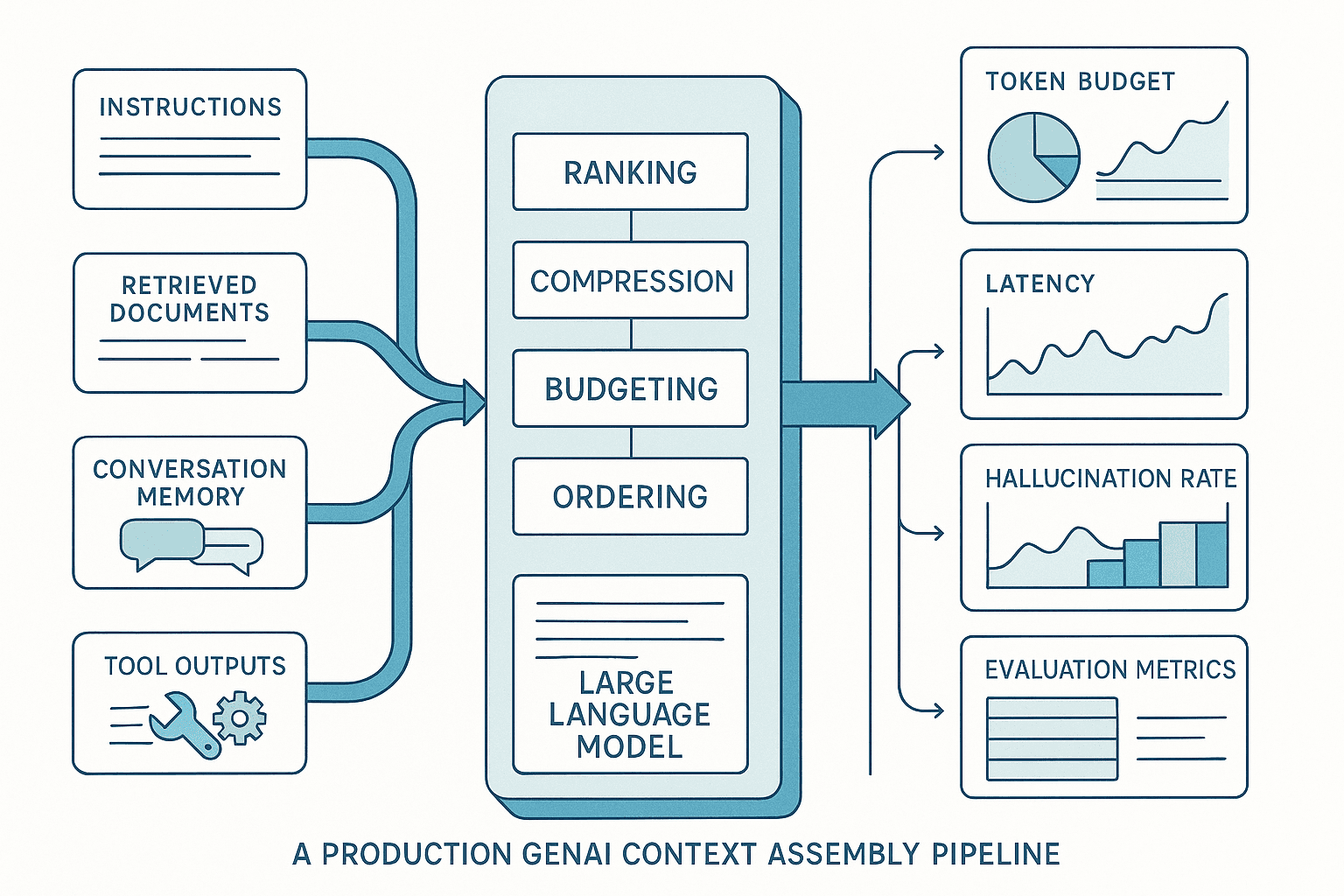
The mature pattern is to treat prompt assembly as a pipeline, not a string template. You explicitly score, filter, compress, order, and budget every context source. You evaluate context quality as a first-class concern. And you observe the pipeline in production so you can explain not just model outputs, but why those outputs happened.
This article covers the practical patterns that matter: context assembly pipelines, salience scoring, chunk compression, memory inclusion rules, lost-in-the-middle mitigation, per-route context policies, evaluation design, and observability patterns. The goal is simple: reduce hallucinations, latency, and cost without assuming you can fine-tune your way out.
The recurring production scenario
Let’s make the failure concrete.
Imagine a B2B SaaS assistant with four major routes:
- Product Q&A over documentation
- Support answer drafting from ticket history
- Account-specific troubleshooting using CRM and logs
- Internal operations assistant using runbooks and recent incidents
The naive implementation tends to look like this:
- One large system prompt with every instruction anyone has ever added
- Last 10 to 20 conversation turns included wholesale
- Top-k retrieval from one vector index
- Full tool outputs pasted verbatim
- Maybe a summary of prior turns if the prompt gets too large
This works surprisingly often at low traffic. Then reality shows up:
- A support conversation accumulates 12k tokens of chatter, but only two turns matter.
- Top-k retrieval returns semantically similar but stale docs.
- Tool results from a CRM call contain 4,000 tokens, while only the account status and plan tier are actually needed.
- An important instruction about compliance appears in the middle of a giant prompt and gets ignored.
- A model with a 128k context window still underperforms because the useful evidence is drowned in low-salience text.
The failure mode is subtle: teams believe they have a retrieval problem or a model problem, but they really have an evidence allocation problem.
Finite windows are not just a hard limit. They are an attention allocation problem. Even when a model can technically ingest large context, performance is not monotonic with more tokens. Relevance density matters.
The pattern: every token must justify itself
A good production mental model is this: context is a scarce resource, not a convenience.
Every token you include should compete for budget against alternatives. An old chat turn competes against a fresh retrieval chunk. A verbose tool payload competes against a compact state summary. A generic instruction competes against a route-specific policy.
This changes how you build systems.
Instead of asking, “What can we include?” ask:
- What evidence is necessary for this route and this user request?
- What evidence is helpful but compressible?
- What evidence is stale, redundant, or low-value?
- What ordering gives the model the best chance to use the evidence?
- What token budget should this route be allowed to spend?
That means your GenAI stack needs a context assembly layer with explicit policies.
Why the naive approach fails
1. Retrieval quality is not the same as context quality
Teams often optimize vector search metrics and assume that solves grounding. But top-k retrieved chunks are only one input to context. Even good retrieval can produce bad assembled prompts if:
- Retrieved chunks are redundant n- High-similarity chunks are low-authority or stale
- The best chunk is too long and hides the key answer
- Retrieval chunks conflict with route rules or account state
- Too many chunks push out critical instructions or tool outputs
Retrieval relevance is local. Context quality is global.
2. Conversation history grows without earning its place
Many systems carry forward raw chat history because it feels safe. In reality, most prior turns are low-value. Pleasantries, repeated clarifications, and already-resolved branches consume tokens and create distraction.
Conversation state should be treated like memory with inclusion rules, not like an append-only transcript.
3. Tool outputs are usually over-included
Production tools return operational payloads, not model-ready evidence. APIs are verbose. Logs are noisy. SQL rows include irrelevant columns. Dumping raw tool outputs into prompts is one of the fastest ways to waste context budget.
4. Prompt order matters more than many teams expect
Long-context models still suffer from position effects. Relevant evidence placed in the middle of a long prompt may be underused. Teams often improve outcomes more by reordering and compacting context than by changing the model.
5. Bigger windows invite sloppier engineering
A 200k-token window sounds liberating. In practice, it often encourages “just stuff more in” behavior, which increases cost and latency while reducing signal density. Larger windows are useful, but they do not remove the need for routing, ranking, and compression.
The better approach: a context assembly pipeline
The architecture that works in production resembles a search-and-ranking system more than a prompt template.
At a high level, the pipeline is:
- Classify the route and intent.
- Set a route-specific token budget.
- Gather candidate context from multiple sources.
- Score candidates for salience, authority, freshness, and necessity.
- Compress or transform bulky candidates.
- Deduplicate and diversify.
- Order the final context to mitigate position effects.
- Generate with explicit answering rules.
- Log the full assembly trace for observability and evals.
Here is a practical reference architecture.
Reference architecture for context engineering
Inputs
Typical candidate sources:
- Global system instructions
- Route-specific instructions
- User message
- Structured user/account state
- Retrieved document chunks
- Retrieved prior conversations or case summaries
- Tool outputs
- Persistent memory items
- Dynamic policy snippets, such as compliance or escalation rules
Core services
-
Intent/router service
- Maps request to route: support QA, draft reply, troubleshooting, summarization, etc.
- Determines required tool calls and context sources.
-
Context policy engine
- Defines token budgets and inclusion rules per route.
- Example: troubleshooting may prioritize logs and account state; drafting may prioritize tone instructions and recent ticket context.
-
Candidate retrieval layer
- Hybrid retrieval: keyword + dense vector + metadata filters.
- Retrieves from separate stores by source type, not necessarily one giant index.
-
Scoring and ranking layer
- Assigns composite scores to each candidate.
- Can use cross-encoders, lightweight rerankers, rule-based features, or model-based salience estimation.
-
Compression/transformation layer
- Summarizes, extracts, or structures long candidates.
- Converts raw tool payloads into model-friendly evidence blocks.
-
Budgeting and packing layer
- Allocates token budget by source type.
- Packs the final prompt with ordering rules.
-
Generation layer
- Calls the model with route-specific generation settings.
-
Observability/eval layer
- Captures what was considered, selected, compressed, dropped, and cited.
Budget by route, not by model maximum
One of the most useful changes teams make is to stop budgeting against the full model window. Budget against what the route actually needs.
For example:
- Product Q&A: 6k input tokens
- Support drafting: 10k input tokens
- Troubleshooting with logs: 16k input tokens
- Internal incident assistant: 20k input tokens
Why do this when the model supports much more?
- It enforces relevance discipline.
- It protects latency SLOs.
- It keeps costs predictable.
- It makes evals comparable across versions.
A route budget should reserve space for:
- Fixed instructions
- User query
- Required structured state
- Retrieved evidence
- Tool outputs
- Optional memory
- Response tokens
A common mistake is letting retrieval consume whatever space remains. Better: set source-level caps.
Example support drafting policy:
- Instructions: up to 1,000 tokens
- User/ticket request: 500 tokens
- Structured account state: 300 tokens
- Recent conversation summary: 600 tokens
- Retrieved ticket/doc evidence: 3,500 tokens
- Tool results: 2,000 tokens
- Slack reserve for dynamic additions: 1,000 tokens
- Output reserve: 1,000 tokens
These are not fixed forever. But without source-level budgets, low-value sources tend to sprawl.
Salience scoring: the heart of context engineering
If you only adopt one concept, make it salience scoring.
For each candidate context item, estimate how likely it is to improve the current answer. In production, this is usually a composite score, not a single model output.
A practical salience score might combine:
- Query relevance: semantic and lexical match to the current request
- Route relevance: usefulness for this task type
- Authority: doc source trust, policy hierarchy, verified tool source
- Freshness: recency weighting for changing domains
- Specificity: exact identifiers, account names, product versions, error codes
- Novelty: non-redundancy relative to already selected context
- Necessity: required by policy or needed for answer constraints
- Compression yield: how much useful signal survives summarization
A simple formula might look like:
salience = 0.30*query_relevance + 0.15*lexical_match + 0.15*authority + 0.10*freshness + 0.10*specificity + 0.10*novelty + 0.10*route_fit
You do not need a perfect formula to get value. Even a modest feature-based ranker usually outperforms raw top-k retrieval plus transcript dumping.
Scoring by source type
Not all evidence should be scored the same way.
- Instructions: score mostly by necessity and route policy, not query similarity.
- Retrieved docs: score by relevance, authority, freshness.
- Conversation turns: score by unresolved entities, commitments, and user preferences.
- Tool outputs: score by direct dependency on the question.
- Memory items: score by persistence value and user-specific importance.
That means you may want separate rankers or feature weights per source type.
Memory inclusion rules: stop carrying raw chat
One of the biggest gains in production comes from replacing transcript inclusion with explicit memory policies.
Think of memory in three buckets:
-
Ephemeral working memory
- Relevant only within the current session or route.
- Example: “User is troubleshooting OAuth failure on tenant acme-prod.”
-
Durable user preferences
- Stable across sessions.
- Example: “User prefers concise answers and Python examples.”
-
Business-critical state
- Should come from source-of-truth systems when possible, not inferred chat memory.
- Example: plan tier, open incidents, region, support entitlement.
Inclusion rules should be explicit.
Include prior conversation only if it contains:
- An unresolved question or branch
- A commitment the assistant made
- User-specific constraints that affect the answer
- Referents needed for disambiguation
- A summary of already reviewed evidence to avoid repetition
Exclude or summarize prior conversation if it is:
- Social or phatic language
- Repeated restatement of the same issue
- Already resolved discussion branches
- Long assistant responses that can be reduced to 1–2 facts
A useful production pattern is maintaining a rolling state object rather than replaying transcript. For example:
json{
  "task": "draft_support_reply",
  "issue": "SSO login fails for users on Okta after domain migration",
  "entities": ["Acme Corp", "tenant=acme-prod", "error=invalid_audience"],
  "constraints": ["Do not promise RCA timeline", "User asked for workaround"],
  "resolved": ["Issue is not billing-related"],
  "open_questions": ["Was metadata refreshed on IdP side?"],
  "user_preferences": ["brief and action-oriented"]
}
That object is far cheaper and often more useful than the last 15 turns.
Compress before you cut
When budgets get tight, many systems simply drop candidates from the tail. That is often too blunt. A better sequence is:
- Remove irrelevant items.
- Deduplicate overlapping items.
- Compress bulky but relevant items.
- Only then drop lower-salience evidence.
Compression can take several forms.
1. Extractive compression
Pull only the spans likely to matter:
- Sentences containing the queried error code
- Sections with policy effective dates
- Rows matching the current account or incident
This is often safer than abstractive summarization in regulated or precision-heavy settings.
2. Abstractive summarization
Useful when source text is verbose and answerable at a higher level.
Examples:
- Summarize a 50-message ticket thread into issue, timeline, actions taken, current blocker.
- Summarize a long incident review into root cause, mitigation, customer impact.
If you use abstractive compression, preserve provenance. Attach references back to source IDs and spans.
3. Schema transformation
Turn raw tool output into a compact structure.
Instead of pasting a 300-line JSON payload from the CRM, transform it into:
json{
  "account_name": "Acme Corp",
  "plan": "Enterprise",
  "status": "Active",
  "region": "us-east-1",
  "open_support_severity": "SEV-2",
  "renewal_date": "2026-01-15"
}
This is one of the highest-ROI interventions in production GenAI.
4. Hierarchical summaries
For very long sources, create summaries at multiple levels:
- Chunk summary
- Document summary
- Collection summary
Then include the smallest sufficient level for the route. Escalate to lower-level detail only if needed.
Lost-in-the-middle mitigation
Long-context models often underuse information buried in the middle of prompts. This is not just a research curiosity; it shows up in production.
Practical mitigations:
Put critical instructions early
Keep the top-level behavior and non-negotiable constraints near the start. Avoid giant instruction blocks with mixed priority. Separate:
- Core behavior rules
- Route-specific rules
- Output format requirements
Put highest-value evidence near boundaries
If you have a few critical evidence blocks, place the most important ones earlier or later rather than in the middle of a long undifferentiated pile.
A common pattern:
- System instructions
- Route rules
- User question
- Key structured state
- Top evidence block(s)
- Additional evidence
- Tool-derived facts
- Final answering reminder
That final reminder can help the model ground on evidence and admit uncertainty.
Use explicit section labels
Make prompt structure legible:
## User Request## Account State## Relevant Product Docs## Ticket Timeline## Tool Findings
Structured sections reduce ambiguity and help both humans and models debug the assembly.
Interleave query and evidence when appropriate
For some tasks, a query-focused evidence presentation works better than dumping documents first. For example:
- User asks: “Can EU tenants use feature X with customer-managed keys?”
- Present the exact policy statement and current feature matrix immediately after the question.
Per-route context policies
A single universal prompt assembly strategy is usually a mistake. Different routes need different evidence shapes.
Route 1: Product Q&A
Priorities:
- Current authoritative docs
- Version-specific product info
- Concise system rules for grounded answering
Policy:
- Minimal chat history
- Strong freshness weighting
- More retrieval budget, less memory budget
- Citation-friendly chunk selection
Route 2: Support reply drafting
Priorities:
- Customer issue summary
- Prior actions already taken
- Tone and workflow constraints
- Relevant policy/runbook snippets
Policy:
- Include concise conversation summary, not raw turns
- Include customer/account state if it affects reply
- Tool output transformed into customer-safe facts
- Reserve budget for drafting examples only if needed
Route 3: Troubleshooting assistant
Priorities:
- Exact error messages and identifiers
- Recent system state/logs
- Environment metadata
- Diagnostic runbooks
Policy:
- High weighting on specificity and freshness
- Strong filtering for account/tenant match
- Structured evidence over prose where possible
- Larger tool-output budget, smaller conversational budget
Route 4: Internal operations assistant
Priorities:
- Recent incidents
- Runbooks
- Current on-call state
- Change history
Policy:
- Strong recency weighting
- Include incident summaries before raw logs
- Cite source systems and timestamps
Per-route policies are how you operationalize context engineering. Without them, every route becomes a compromise that serves none well.
Model and tool comparisons: where different components help
Context engineering is model-agnostic in principle, but some choices affect tradeoffs.
Large frontier model vs smaller model + stronger context pipeline
A common production finding: a smaller or mid-sized model with disciplined context assembly often beats a larger model fed noisy context.
Why?
- Better evidence density improves answer quality.
- Lower input cost lets you retrieve/rerank more candidates upstream.
- Lower latency improves UX and enables additional guardrail passes.
Use the larger model when:
- Multi-document synthesis is complex
- Compression fidelity matters
- Tool reasoning is deep
- Output quality needs exceed what smaller models can do
Use a smaller model when:
- The task is strongly grounded
- Output format is constrained
- Most of the quality problem is evidence selection, not reasoning depth
Embedding retrieval vs hybrid retrieval
Dense retrieval is convenient, but hybrid retrieval usually wins in enterprise settings because exact identifiers matter.
Use hybrid retrieval when queries include:
- Error codes
- SKUs
- Policy IDs
- Product/version names
- Ticket numbers
- Account or tenant identifiers
Dense retrieval alone often misses these exact-match signals or overweights semantically similar but operationally irrelevant text.
Reranker choices
Options:
- Rule-based heuristic ranker: cheap, interpretable, good baseline
- Cross-encoder reranker: stronger relevance, more latency
- LLM-based ranker: flexible but costly
A strong production pattern is cascade ranking:
- Cheap retrieval of many candidates
- Lightweight heuristic filtering and metadata constraints
- Cross-encoder rerank on narrowed set
- Optional LLM compression on top few bulky items
This often gives better cost/quality than throwing an LLM at every candidate.
Implementation details that matter
1. Maintain source provenance all the way through
Every context item should carry metadata:
- Source type
- Source ID
- Retrieval score
- Salience score
- Freshness timestamp
- Compression method
- Parent source references
- Token count before/after compression
This matters for audits, citations, debugging, and evals.
2. Normalize all candidates into a common envelope
A useful internal representation:
json{
  "id": "doc_123_chunk_4",
  "source_type": "retrieved_doc",
  "content": "...",
  "metadata": {
    "title": "SSO configuration guide",
    "authority": 0.92,
    "freshness_days": 14,
    "route_fit": "troubleshooting",
    "source_uri": "kb://sso/config-guide"
  },
  "features": {
    "semantic_score": 0.84,
    "bm25_score": 12.7,
    "specificity_score": 0.91
  },
  "compression": {
    "applied": false,
    "original_tokens": 420,
    "current_tokens": 420
  }
}
Once everything shares an envelope, your ranking and budgeting logic becomes much cleaner.
3. Use source-type-aware packers
Packing is not just sorting by score and taking until the budget runs out. You need constraints like:
- At least one authoritative policy item if policy-sensitive route
- At most two memory items unless explicitly required
- No more than 40% of budget from a single document
- Prefer diversity across sources after top-1 evidence
Think of prompt packing as a constrained optimization problem.
4. Keep a reserve budget
Production prompts often need last-minute additions:
- Tool call output arrives
- Safety/compliance rule must be inserted
- User clarifies with a critical detail
If you pack to 99% every time, your system becomes brittle. Reserve slack.
5. Compress offline where possible
Not every summary should happen in the online path.
Good offline candidates:
- Document section summaries
- Ticket thread summaries after closure
- Incident digests
- Structured extraction from static docs
This reduces latency and variability. Use online compression only for truly dynamic context.
6. Treat tool output formatting as a product feature
If your tools are designed for humans or machines but not for models, your prompt quality will suffer. Build model-facing adapters:
- SQL result condenser
- CRM fact extractor
- Log anomaly summarizer
- Policy diff extractor
This is often more impactful than swapping the generator model.
Evaluation strategy: evaluate the context, not just the answer
Many teams run answer-level evals only: correctness, helpfulness, citation accuracy. That is necessary but not sufficient.
You should also evaluate the context pipeline itself.
Core context eval questions
For a given query and gold answer:
- Did the pipeline retrieve the necessary evidence?
- Did it select the best evidence among retrieved items?
- Did compression preserve the critical facts?
- Did prompt ordering help or hurt evidence use?
- Did low-value context displace high-value context?
Useful metrics
Evidence recall
Of the gold-required evidence items, what fraction were present in the assembled context?
This is often more actionable than answer correctness when debugging.
Evidence precision
What fraction of included evidence was actually relevant to the answer?
High recall with low precision often produces bloated prompts and uneven quality.
Context utilization
Did the answer actually use the included evidence?
You can estimate this by citation matching, entailment checks, or judge-model comparisons between selected evidence and final answer.
Compression faithfulness
When a chunk or tool output is compressed, does the compressed version preserve critical facts and qualifiers?
Measure with targeted assertions, not just generic summary quality.
Position sensitivity
Does moving a key evidence block earlier or later materially affect answer quality?
This helps detect lost-in-the-middle issues.
Cost and latency per successful answer
Raw quality is not enough. Track quality-adjusted cost.
Build adversarial eval sets
Production context systems fail on edge cases more than on happy paths. Include:
- Conflicting docs with different timestamps
- Nearly identical chunks where only one has the current policy
- Long conversational threads with one critical detail
- Verbose tool payloads where only a few fields matter
- Exact identifier queries that semantic search alone may miss
- Cases where the answer should be “insufficient evidence”
Ablation testing
One of the most useful evaluation techniques is systematic ablation.
Run the same query set with variations like:
- No memory
- No compression
- Different ordering strategies
- Dense retrieval only vs hybrid retrieval
- Raw tool outputs vs structured tool summaries
- Larger context budget vs smaller but better-ranked budget
You will often discover that one “obvious” source adds little value or actively harms outcomes.
Observability: make context decisions inspectable
If a production GenAI stack cannot explain its context assembly, it is hard to improve responsibly.
At minimum, log for each request:
- Route selected
- Token budget by source type
- Candidate sources considered
- Scores for each candidate
- Compression steps applied
- Items dropped and why
- Final prompt composition and token counts
- Model latency and cost
- Output with citations or source references
Then build operational views:
1. Context waterfall
A trace showing:
- 120 candidates retrieved
- 40 passed metadata filters
- 12 reranked highly
- 5 compressed
- 8 packed into final prompt
- 2 dropped due to budget
This is the prompt equivalent of a search ranking trace.
2. Budget heatmaps
Show token usage by route and source type over time. This helps identify drift, such as a tool adapter suddenly sending much larger payloads.
3. Quality-vs-budget dashboards
Plot answer quality against input tokens. Many teams learn that after a certain budget, quality flattens while cost continues rising.
4. Missing-evidence audits
For bad answers, inspect whether the required evidence was:
- Never indexed
- Not retrieved
- Retrieved but not selected
- Selected but compressed badly
- Included but ignored due to ordering or model behavior
That breakdown tells you where to invest.
Cost and latency tradeoffs
Context engineering is partly economics.
Here is the tradeoff most teams face:
- More retrieval candidates improves recall but increases rerank latency.
- More context improves evidence coverage but raises generation latency and cost.
- More compression can save tokens but adds extra model calls.
The right answer is rarely “maximize everything.”
A common production strategy is a staged cascade:
- Cheap broad retrieval
- Cheap filtering and exact-match constraints
- Moderate-cost reranking on a smaller set
- Compression only for oversized high-value items
- Generation with a tight route budget
This minimizes expensive operations on low-value candidates.
A few practical heuristics:
- Use exact-match filters early when identifiers are present.
- Prefer extractive compression to abstractive compression when possible.
- Cache summaries for semi-static sources.
- Set separate SLO tiers for routes; not all requests deserve the same pipeline depth.
- Consider “fast path” and “deep path” policies. Fast path uses lighter retrieval and smaller budgets; deep path escalates when uncertainty is high.
Uncertainty-triggered escalation
One strong design is to start with a cheaper context plan and expand only when needed.
Signals for escalation:
- Low top-evidence score
- Conflicting top sources
- Missing required policy source
- Model expresses low confidence or inability to ground
- User asks a high-risk question
Then escalate by:
- Retrieving more broadly
- Running a stronger reranker
- Expanding budget for evidence
- Calling additional tools
- Switching to a stronger model
This beats always paying for the heaviest pipeline.
What this looks like operationally
A mature production team eventually treats context as a product subsystem with owners, dashboards, tests, and deployment controls.
A strong weekly review might include:
- Top hallucination incidents traced to context failures
- Routes with budget creep
- Compression regressions
- Retrieval freshness drift
- Cases where memory inclusion caused wrong answers
- Cost per successful task by route
And release changes should be measurable:
- “Changed support-drafting route to summarize ticket history into state object”
- “Added freshness weight for policy docs”
- “Moved compliance rule to top-level route instructions”
- “Switched CRM tool output from raw JSON to structured facts”
Those changes are far more actionable than vague prompt edits.
Practical takeaways
If you are running GenAI in production, context engineering is one of the highest-leverage places to invest. Not because it is glamorous, but because it directly affects quality, cost, latency, and debuggability.
The key lessons are straightforward:
- Do not treat the prompt as a static string. Treat context assembly as a pipeline.
- Budget by route and source type, not by maximum model window.
- Score salience explicitly across relevance, authority, freshness, specificity, and necessity.
- Replace raw transcript carry-forward with memory inclusion rules and compact state.
- Compress bulky but relevant evidence before dropping it.
- Reorder prompts deliberately to mitigate lost-in-the-middle effects.
- Build different context policies for different routes.
- Evaluate context quality directly, not only final answers.
- Instrument the pipeline so every included or dropped token can be explained.
The broader point is this: in production GenAI, better answers often come less from changing the model and more from changing what the model sees.
Finite windows are not just a limitation to work around. They are a forcing function for better system design. Teams that embrace that reality usually ship assistants that are cheaper, faster, and more trustworthy than teams that keep trying to win by stuffing more tokens into the box.